Retail POS System for Shops in Pakistan

A customer puts six items on the counter. One price tag has fallen off, the calculator is running, and three more people are waiting. At closing time, the stock register still lists the rice you sold at noon.

A retail POS system closes the gap between the counter and the stockroom. It rings up each sale, totals the bill, records how the customer paid, prints the invoice, and keeps the transaction on file. A good POS system for a retail store also ties those sales to inventory and the books, so the numbers you read at night match what happened on the floor.

ManageKaro is a cloud-based business management platform for Pakistani retailers, wholesalers, and growing businesses. Its POS module runs billing and checkout, and it shares one account with inventory and financial management. This page covers what that means for a retail store and what to check before you choose any retail POS software.

View Pricing
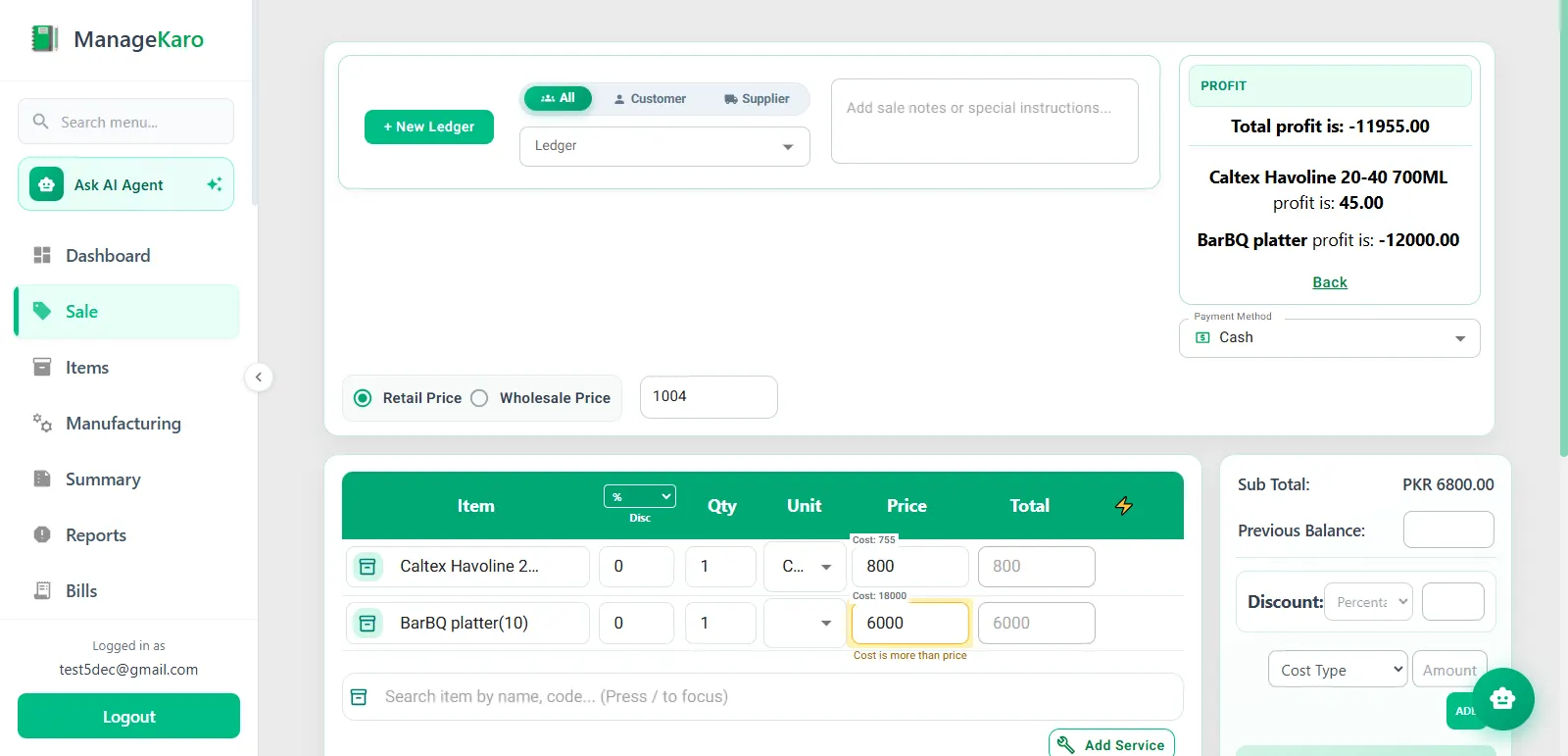
ManageKaro retail POS billing screen with items, quantities, prices, discount and payment method

Why Retail Stores Need a Dedicated POS System

Most stores start with a notebook, a calculator, and a spreadsheet. That holds up until the product range or the crowd grows, and then the same problems keep coming back.

  • Hand-calculated bills produce wrong totals and missed discounts, and the customer is usually the one who notices.

  • Stock records drift when sales go in one book and stock in another: you find out when a customer asks for an item the register says you have, or after you reorder something already sitting in the godown.

  • Product lookups slow the queue when cashiers rely on memory or a price list, and new staff are the slowest.

  • Closing takes longer when the day's sales must be added up from slips, so the owner sees the result late.

  • A second counter or branch multiplies all of it, because two registers cannot tell you what is left on the shelf.

Manage Retail Sales and Billing With ManageKaro

In ManageKaro, a retail sale follows a short path. Staff search for products, add them to a bill, apply supported discounts, record the payment, and issue the invoice. The completed sale is saved as a transaction the owner can look up later.

Because the POS shares an account with inventory and financial management, the sale is not typed in again elsewhere. Stock quantities update from it, and it connects to the financial records. ManageKaro's POS software page describes the product for retail, wholesale, and other business types. This page stays at the retail counter.

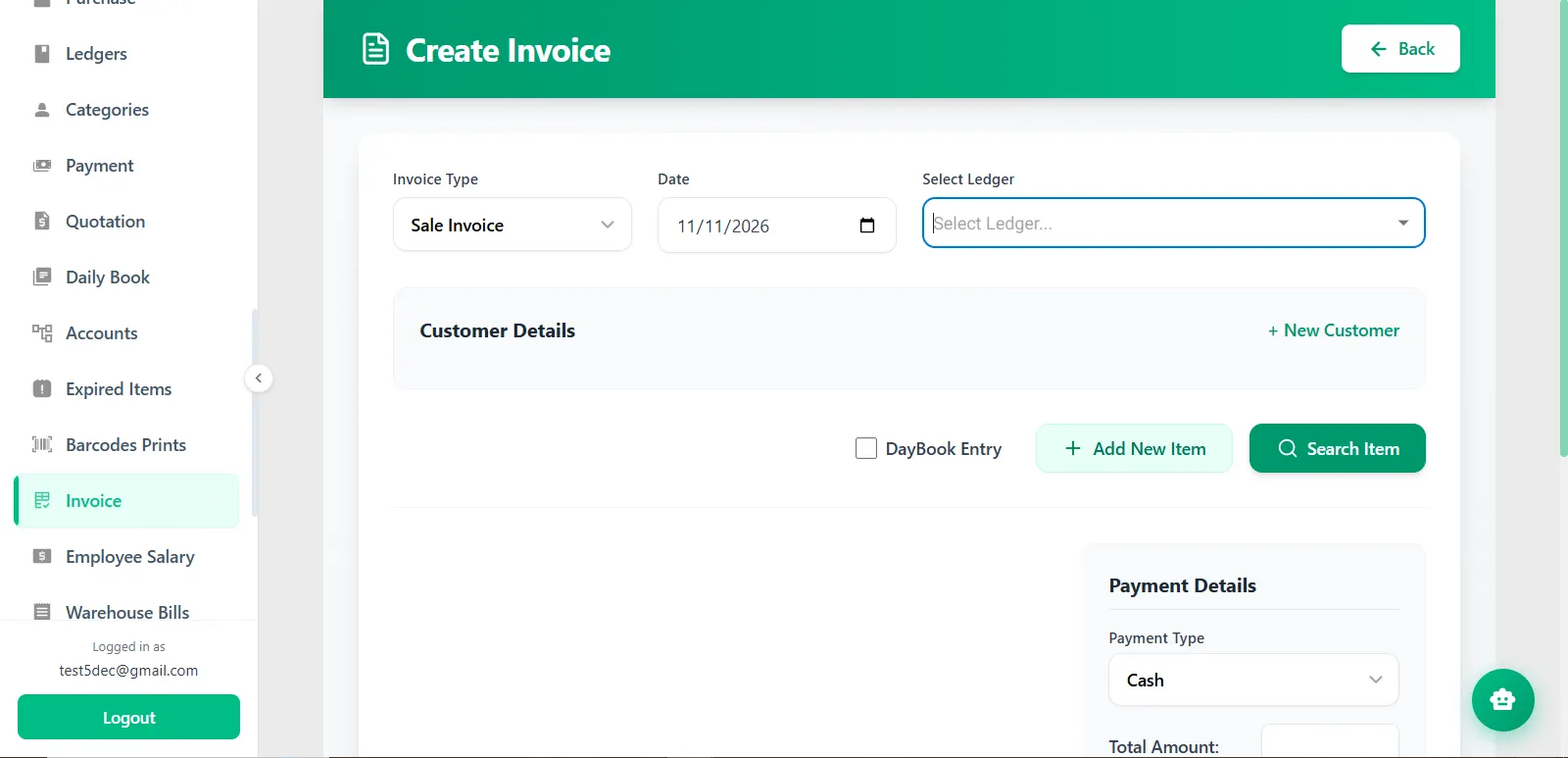
ManageKaro Create Invoice screen with invoice type, date, ledger, customer details and payment details

Key Features of ManageKaro Retail POS Software

These are the parts of the system a retail counter uses every day.

Retail Billing and Checkout

Cashiers select products, set quantities, and watch the total build on screen. Supported discounts are applied before payment, and the sale closes with cash, card, or another supported payment method. The invoice prints on a regular or thermal printer. Because the arithmetic happens in the software, the bill the customer holds and the record you keep show the same figures.

Product Search and Barcode-Based Workflows

Staff can find a product by searching or through barcode-based workflows and add it to the bill. In a store with a long product list, search time is what slows the queue. Test your own scanner during the trial before you buy new hardware.

Sales and Transaction Records

Every completed sale is stored as a transaction. When a customer questions a bill, or you want to check what was sold on a particular day, you open the record instead of hunting through slips.

Inventory Connected With Retail Sales

Sales made in the POS reduce the related stock quantities, so the inventory view reflects what has left the shelf without a second entry.

Customer Transaction Management

Customer ledgers hold an individual account for each customer, with balances, payments, and transaction history. That helps stores that keep running accounts for regular customers.

Retail Sales Reporting

Recorded sales feed reports for sales, purchases, and profit and loss. Instead of adding up slips at closing, the owner reads the day's figures from the system.

Multiple Counters and Branch Management

ManageKaro supports multiple counters and branches, so a store with more than one billing point can keep its sales in one system instead of one register per counter. Details such as user access and branch-level reports differ between businesses, so walk through your own layout in a demo.

View POS Software

How ManageKaro POS Works in a Retail Store

Picture a general store in Rawalpindi at five in the evening, with a queue at the counter. The example is illustrative, not a customer account, and the stock figure is a sample.

  1. Search or scan. The cashier searches for two 5 kg bags of rice or scans the barcode, then does the same for a liter of cooking oil and three 1 kg bags of sugar.

  2. Add to the bill. Each product lands on the bill with its quantity, and the cashier can change a quantity before moving on.

  3. Calculate the total. The POS adds up the lines. If the store allows a discount on this order, the cashier applies it before payment.

  4. Record payment. The customer pays with cash or card, and the cashier records the method on the bill.

  5. Print the invoice. The invoice prints on the counter's regular or thermal printer, and the transaction is saved.

  6. Records update. The sold quantities come off the stock record. If the system showed 36 bags of rice before this sale, it shows 34 afterward, and the sale also feeds the financial records.

  7. Review. At closing, the owner opens the day's transactions and reads the totals without adding up slips.

Manage Retail Sales and Inventory From One Platform

Stock problems in a store usually start at the seam between selling and recording. In ManageKaro, the POS and inventory read from the same product and stock data, so that seam is smaller.

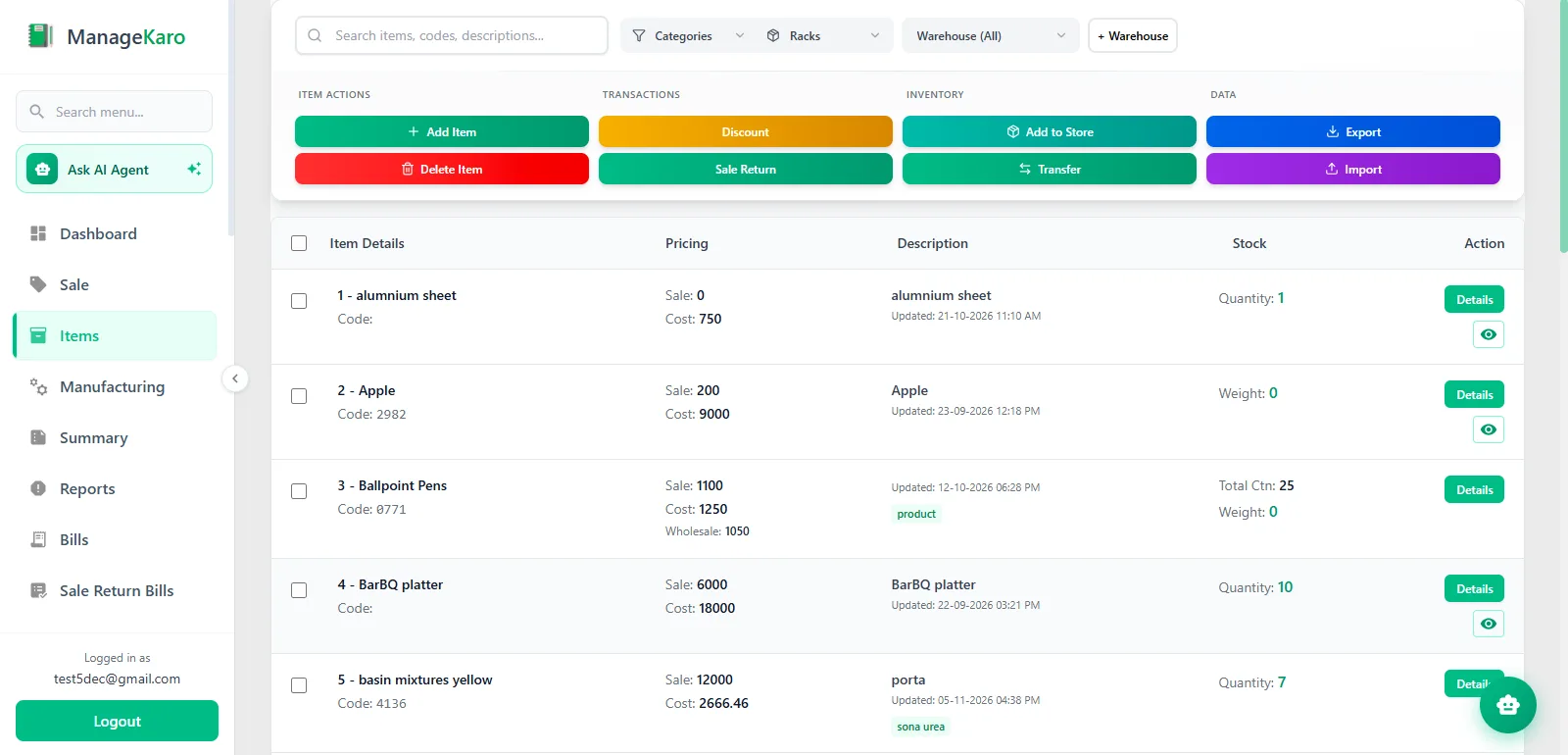
Each POS sale lowers the stock of the items sold. Inventory can be organized by warehouse, rack, and sub-rack, which helps stores that keep goods in a back room or godown as well as on the shelf. Stock moved between warehouses or branches is recorded as a transfer instead of being adjusted by hand. All of this lives in the inventory management software, which the POS draws on at the counter.

For the owner, the change is practical. A cashier asked whether an item is in stock can check one record. Quantities for purchasing decisions come from the system. Transfers between locations are recorded.

Physical counts still matter, because software can only record what was received, sold, and moved. Reorder decisions stay with the owner, who at least starts from current quantities.

View Inventory Management Software

ManageKaro inventory screen with the product catalog, item actions and stock quantities

Which Retail Businesses Can Use ManageKaro?

ManageKaro fits stores that sell physical products at a counter. The use case differs by store type.

Grocery and kiryana stores: many low-priced items and many repeat customers. Name search or barcodes keep the queue moving, and customer ledgers track regulars with running balances.

General stores: a mixed range of household goods and daily needs sits in one product list with one stock record, replacing separate notebooks.

Supermarkets and cash-and-carry businesses: several counters, larger quantities, and goods held in a back store. Multiple counters and warehouse, rack, and sub-rack organization both apply.

Clothing and apparel shops: garment and fabric stock, with sales and customer transactions recorded in one place. If you sell one style in many sizes and colors, check how those items are set up during the trial.

Electronics and mobile shops: devices and accessories kept as organized product records with stock quantities. If you must track serial numbers or IMEIs per unit, raise that in a demo first.

Hardware stores: a wide range of fittings and parts spread across shelves and storage, which suits racks and sub-racks. Contractor udhaar, quotations and site delivery are covered on our hardware store POS software page.

Pharmacies, restaurants, and wholesalers have workflow needs beyond the retail counter, such as expiry handling or table service. The POS software covers how ManageKaro approaches those businesses.

Why Retailers Should Connect POS With Financial Management

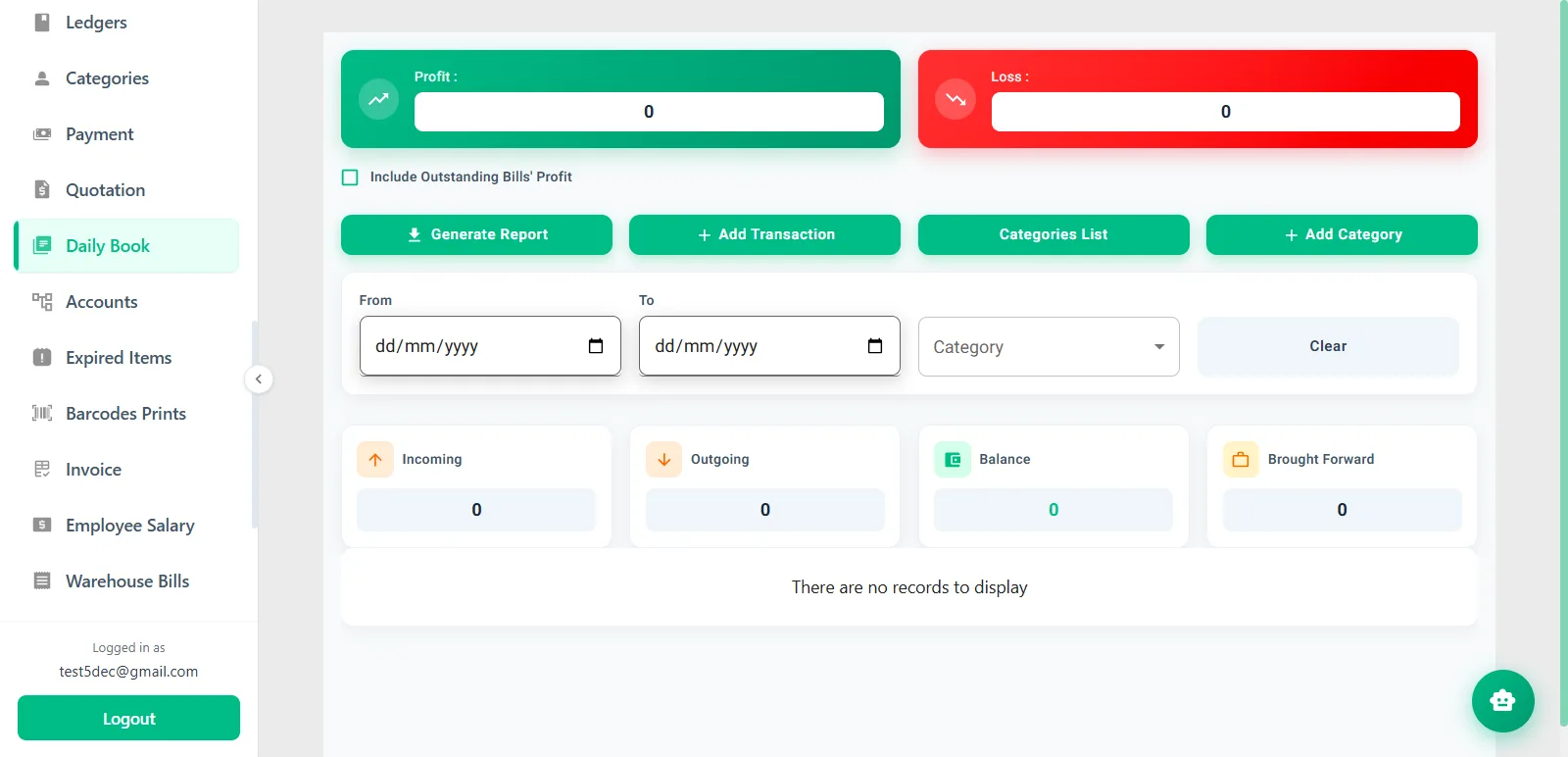
Sales totals show what came in. They do not show what the business kept after expenses. ManageKaro's financial management software tracks daily sales, expenses, purchases, customer ledgers, and profit and loss. Because the POS sits in the same platform, sales activity connects to those records instead of being retyped into a separate ledger.

At closing, an owner can read the day's sales next to recorded expenses, check which customers carry outstanding balances, and review sales, purchase, and profit-and-loss reports for the period. The figures are only as complete as the entries behind them: an expense paid from the till has to be recorded before it shows up.

Keeping both in one platform means the owner reads one set of records instead of comparing a POS report with a separate ledger by hand.

View Financial Management Software

ManageKaro Daily Book with profit, loss, incoming, outgoing, balance and brought-forward totals

How to Choose the Best Retail POS Software for Your Store

No retail POS is the best for every store. The best retail POS software for yours is the one that matches how your counter, stockroom, and books actually work. These are the questions worth asking any vendor, ManageKaro included.

  • Billing and checkout: can a new cashier finish a sale with a discount and a payment in a few steps? Time it.

  • Product search and barcodes: search by name, scan a barcode, and check that your existing scanner works.

  • Inventory connection: does a sale change stock on its own, and can you see stock by location?

  • Sales reporting: can you read daily sales and period reports without rebuilding them in a spreadsheet?

  • Customer records: are balances and payment history kept per customer?

  • Counters and branches: how are they added, and does each one cost extra?

  • Internet and offline use: what keeps working if the connection drops, and what syncs afterward?

  • Hardware: which printers, scanners, and cash drawers work, and which do you already own?

  • Pricing and licensing: subscription or one-time, per counter, per branch, or per business, and what is included?

  • Support: which channels, which hours, and is training included?

  • Tax invoicing: if you must report invoices to FBR or a provincial authority, ask whether the vendor supports it, what it costs, and who maintains it. A digital invoice alone does not mean compliance.

ManageKaro Retail POS Pricing and Free Trial

ManageKaro offers a 3-day free trial, an annual plan, and lifetime access.

OptionPriceWhat it includes
Free trialUSD 0 for 3 daysAccess to all features. No credit card required, according to the pricing page.
Annual PlanUSD 36 per yearAll features, priority support, regular updates.
Lifetime AccessUSD 89, one timeLifetime access to all features, priority support, future updates, no recurring fees.

The trial is temporary evaluation access, not a free plan. Plan prices cover the software. A computer, barcode scanner, and receipt printer, your internet connection, and any charges from your bank or card processor are separate, so ask the team what applies to your setup. Current plan details are on the pricing page.

View Pricing
Customer stories

What Our Users Are Saying!

Treet Corporation
Treet Corporation
Kot Lakhpat, Lahore

“With a large workforce at Kot Lakhpat, salaries, advances and leave records used to take our team days every month. Since moving to ManageKaro’s HR module, attendance and payroll run smoothly and payslips go out on time without endless Excel sheets. The Financial Management side has been just as useful: expenses, ledgers and cash flow sit in one place, and P&L reports are ready whenever management asks. Month-end is honestly far less stressful now. A solid Pakistani product that delivers.”

Modules usedFinancial ManagementHR Management
Zohan Traders
Zohan Traders
Rasool Pur, Faisalabad

“Pehle sab kuch register mein likha hota tha aur stock ka kabhi pata nahi chalta tha. ManageKaro’s POS changed that for us. Barcode scan karo, bill ready, and the customer gets it on WhatsApp too. Low-stock alerts mean we reorder before items run out, so no customer goes back empty-handed. Even when the internet goes off in Rasool Pur, the counter keeps working without any issue. For a trader like us, the price is very reasonable. Faisalabad ke dukandaron ko zaroor try karna chahiye.”

Modules usedPOS & Inventory Management
Yasin Auto & Spare Parts
Main Kacha Ravi Rd, Karim Park, Lahore

“In spare parts, keeping track of thousands of small items is the hardest job. ManageKaro’s rack and sub-rack system fixed that; my staff now finds any part in seconds instead of searching the whole godown. We also launched our own online store, and mechanics from other areas order directly from there. Delivery challans and dispatch status are all tracked, so no more ‘parcel kahan hai’ calls. Our business on Kacha Ravi Road has really grown. Shukriya, ManageKaro team!”

Modules usedInventory ManagementOnline StoreDelivery Management
Ashraf Son’s International
Hall Rd, Garhi Shahu, Lahore

“Hall Road pe din bhar rush hota hai, and in electronics every item has its own model and price. ManageKaro’s POS keeps the counter moving: scan, bill, done, whether the customer pays cash, card or bank transfer. Stock across our shop and godown stays updated, and transfers are easy to record. I can check daily sales from my phone even when I’m away from the shop. Simple software, honest pricing, and their WhatsApp support always responds quickly. Bohat acha experience raha hai.”

— Owner, Ashraf Son’s International

Modules usedPOS & Inventory Management
Al-Harmain Sanitary Store
Madina Town, Bahawalpur

“Sanitary ke kaam mein pipes, fittings aur taps sab alag sizes mein hotay hain, and managing that stock was a real headache. ManageKaro sorted it out. Every item is in the system, low-stock alerts warn us early, and counter billing is quick. For contractors and home orders, delivery challans are made in a minute and we track every dispatch until it reaches the site. Bahawalpur mein itna acha system milna mushkil hai. Our hisaab kitaab is finally clean now, Alhamdulillah.”

Modules usedPOS & Inventory ManagementDelivery Management
Madina Super Store
Madina Super Store
Umer Khan Rd, Manawan, Lahore

“A super store has hundreds of items and customers all day, so speed at the counter really matters. ManageKaro’s POS with barcode scanning has made checkout quick, and stock updates automatically with every sale. The Financial Management side is my favourite: daily book, expenses, supplier ledgers and udhaar balances all in one place. At the end of the day I know exactly what came in and what went out. Manawan ke dukandaron ko zaroor recommend karunga. Great value for money.”

Modules usedPOS & Inventory ManagementFinancial Management
Nawab Machinery Store
Machinery Retailer · Rawalpindi, Pakistan

“ManageKaro has made it easier for us to manage our daily business activities. Its POS and billing, inventory management, and financial management features help us keep our sales and inventory records better organized. Having these essential business functions available in one platform makes our everyday operations more convenient. We particularly appreciate how ManageKaro helps simplify billing and maintain organized business records. It has been a useful solution for managing our machinery business more efficiently.”

Modules usedPOS and BillingInventory ManagementFinancial Management
Super Machinery Store
Machinery Retailer · Rawalpindi, Pakistan

“ManageKaro has helped us bring important parts of our business management together. We use its POS and billing, inventory management, and financial management features to handle our daily operations. The system has given us better control over product sales and stock while helping us keep our business activities more organized. Having billing, inventory, and financial management connected in one platform makes it easier to manage our day-to-day work. ManageKaro has been a helpful addition to the way we manage our machinery store.”

Modules usedPOS and BillingInventory ManagementFinancial Management
FAQ

Frequently Asked Questions

Retail point of sale software runs the sale at the counter: it looks up products, totals the bill, records payment, and issues the invoice. Compared with a plain billing app, a retail POS also holds the product list and stock quantities, so each sale updates what you have left.

It depends on your product range, number of counters, budget, and tax reporting needs. Shortlist two or three systems, run your own products through each trial or demo, and compare them against the checklist above. ManageKaro suits stores that want billing, inventory, and financial records under one subscription. If you need FBR invoice integration, confirm it with each vendor before you decide.

Each sale subtracts the sold quantity from the item's stock, and purchases and transfers adjust it in the other direction, so the system shows a current quantity per item. In ManageKaro, POS sales update inventory, and stock can be organized by warehouse, rack, and sub-rack. Physical counts are still needed to catch damage, theft, and entry mistakes.

Yes. A small shop with one counter can start with POS and inventory, then add financial management when it wants expenses and profit in the same place. You will usually want a computer or laptop and a printer for invoices. The trial lets you test with your own products before you pay.

Many can, but it varies by product. ManageKaro supports multiple counters and branches, and inventory can be organized across locations with transfers between warehouses. Ask about user access and branch-level reports for your setup in a demo.

Yes. ManageKaro's POS supports barcode-based product workflows alongside name search. Test your own scanner during the trial.

Pakistani vendors price in three ways: a monthly subscription, an annual or lifetime license, or a quote per business. As of November 2026, published entry-level monthly plans from vendors selling in Pakistan start at roughly USD 8.29 to 9.01, and prices rise with more counters, branches, and add-ons such as tax integration. ManageKaro lists an Annual Plan at USD 36 per year and Lifetime Access at USD 89 one time. Budget separately for hardware such as a barcode scanner and receipt printer.

In ManageKaro, yes. POS and financial management are modules of the same platform, so sales activity connects to the records that track expenses, customer balances, and profit and loss. With other vendors, ask whether financial features are built in or sold as a separate product.

Yes. ManageKaro offers a 3-day free trial with access to all features, and its pricing page says no credit card is required. It is temporary evaluation access, not a permanent free plan. After the trial, you choose the Annual Plan or Lifetime Access.

Test ManageKaro With Your Own Products

Explore ManageKaro Features

The fastest way to judge a retail POS is to bill your own sales through it. Start the 3-day free trial, load your products, and run a normal day. The trial is short, so have your product list ready before you sign up. If you would rather look around first, the features overview covers every module.