Inventory Management Software for Distribution Companies and Wholesalers in Pakistan

A shopkeeper in Sargodha calls for 40 cartons. Your register says 55 are in stock. The godown has 30, and nobody can say whether the rest went to the branch last week or never arrived from the supplier. Most stock problems in a distribution business look like this one: the goods exist somewhere, but the record doesn't say where.

ManageKaro is distribution inventory management software for businesses that buy in bulk, store in godowns and supply shops and dealers. It shows stock for each godown and rack, records transfers between locations, creates delivery challans and vehicle gate passes, and keeps a ledger for every customer. The annual plan costs $36, and you can test it on your own stock with a 3-day free trial that needs no credit card.

Talk to Our Team
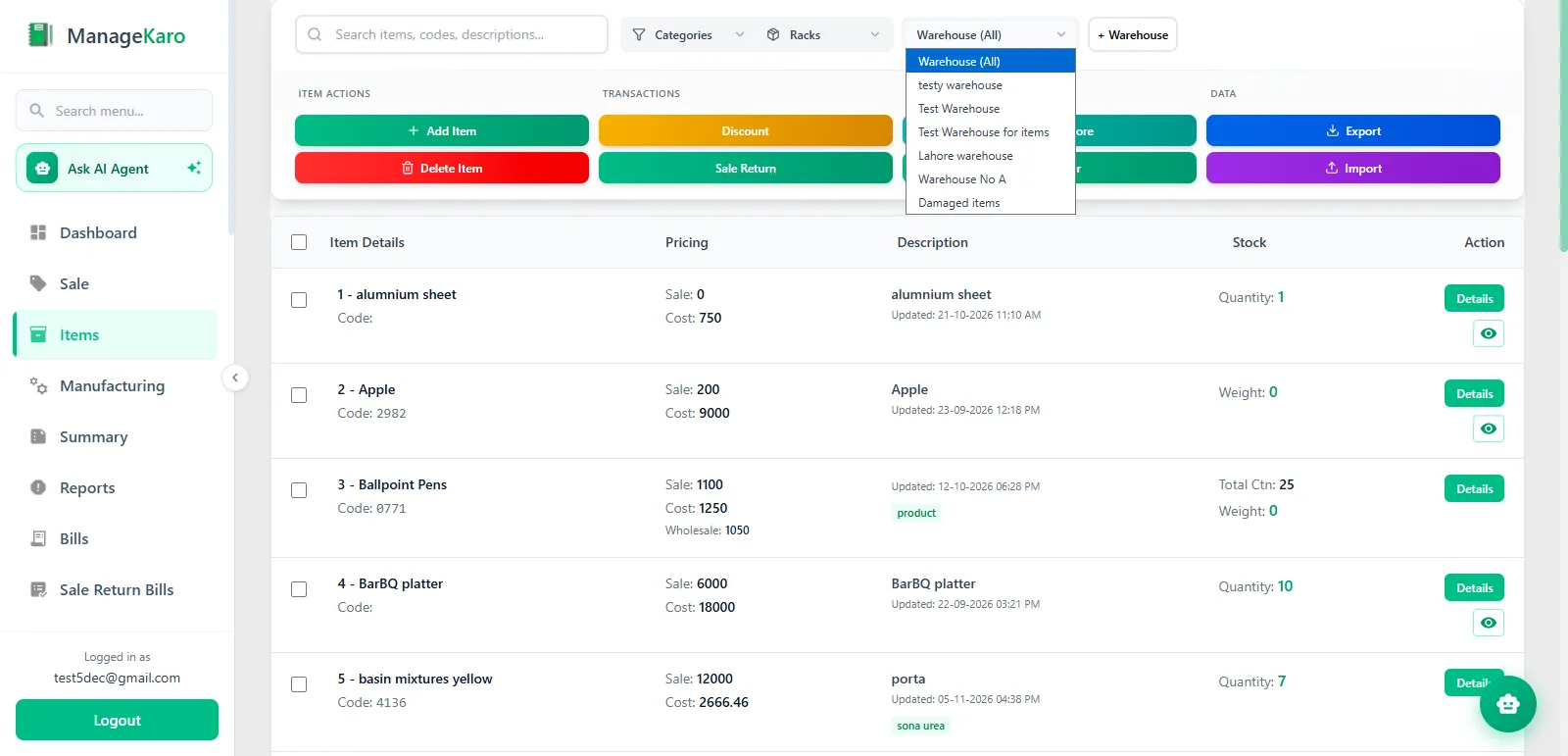
ManageKaro inventory screen showing items filtered by warehouse for a distribution business

What distribution inventory means for a distributor in Pakistan

Distribution inventory is the stock a distributor or wholesaler holds between the supplier and the shop. It includes goods in the main godown, goods at branch stores, goods moving between the two, and goods loaded for delivery.

It behaves differently from stock in a retail shop. You count it in cartons and bags. It leaves on a loader with a challan instead of over a counter with a receipt, and much of it is sold on credit to customers who pay weeks later.

The trade around it is large. Wholesale and retail trade made up 17.8% of Pakistan's GDP in fiscal year 2025-26, according to the Pakistan Economic Survey, which makes it the biggest part of the services sector. Walk through any wholesale market, though, and you will still find stock tracked in a register, an Excel sheet or one trusted employee's memory.

If this kind of tool is new to you, our guide on how inventory management software works is a good place to start.

Where stock goes wrong in a distribution business

The register and the godown disagree

Stock comes in by the truck and goes out by the carton, all day. When entries are written up in the evening from memory and loose slips, small misses pile up until the book total means nothing. Our post on inventory loss in small businesses covers the usual causes.

The stock is there, but in the other godown

A single total hides where the goods are. You refuse an order, or buy more, while the same item sits in the second godown.

Goods leave without paper

A loader is packed in a hurry and the challan is written later, or never. Three weeks on, the customer disputes the quantity and there is nothing to check it against.

Fast items run out and slow items pile up

Without a low-stock warning, you learn that a fast-selling item is finished when a customer asks for it. Meanwhile, cash stays locked in items that have not moved since last season.

Credit grows with every delivery

Much of wholesale selling runs on udhaar. If deliveries are recorded in one place and payments in another, you find out a customer's real balance only when you sit down to total it.

What the distribution inventory management software does

Everything below is part of the standard product on both paid plans.

Stock for each godown, branch and shop

Godown stock management starts with a separate count for each location. Every godown, branch and shop is set up as its own warehouse, and each one carries its own quantity for every item. Before you promise an order, you can see which location has the goods. One account can hold several warehouses, which is the basis of multi-location inventory control.

Transfers between godowns

When a branch runs short, you record a transfer: which items, from which godown, to which one. The movement stays on record, so you are not left guessing what was sent or when.

Racks and sub-racks

Inside a godown, each item can be given a rack and a sub-rack. A new helper can then find an item by its location instead of asking the one person who knows the godown.

Low-stock alerts

Low-stock alerts flag items that are running down, so the order goes to the supplier before the last carton does.

Counter sales that update stock

Many wholesalers also sell over the counter. A sale billed through the POS and billing software reduces stock at that location, and the bill can be printed on a regular or thermal printer.

Delivery challans and vehicle gate passes

Each dispatch gets a delivery challan listing the items and quantities, and each vehicle leaving the godown gets a gate pass with the driver's details. Delivery status is updated as the order moves, and the record stays on file for the day a customer questions a quantity. The delivery management software page shows the full workflow, and our guide to delivery challan software explains what a challan should contain.

Customer ledgers and credit sales

A credit sale posts to the customer's ledger when it is billed. The ledger shows what each party bought, what they paid and what is still outstanding, so the balance is ready when the customer calls or your recovery man goes out. Ledgers, the daily book, the cash book, and profit and loss reports are in the accounting software that comes with every plan.

Purchase records you can search

Purchases are stored with the supplier's name and the date, and can be searched by either. When a supplier's bill and your record differ, you can pull up the entry in seconds. For more on the buying side, see our post on purchase management.

Offline work and phone access

Godowns are not known for good internet. The desktop app keeps working offline and syncs when the connection returns. Away from the office, you can open the same account in a phone browser to check stock or a customer's balance.

Staff access by location

Staff logins can be limited by location, so the branch storekeeper sees the branch and you see everything. Attendance and salaries for godown staff, drivers and helpers are handled in the HR and payroll module.

How inventory management for distribution companies works day to day

One working day on the system runs like this, from a truck arriving to the evening closing.

  1. 1

    Stock arrives. The quantities are added to the godown that received the truck, and the purchase is saved against the supplier.

  2. 2

    Stock is put away. Each item gets its rack and sub-rack.

  3. 3

    An order comes in by phone or WhatsApp. You check which godown has the goods and send a quotation if the customer wants one.

  4. 4

    The order is billed. The quotation becomes an invoice without retyping, GST and discounts are calculated, and a credit sale goes to the customer's ledger. The invoice can be printed, or shared on WhatsApp or by email.

  5. 5

    The order is dispatched. A delivery challan goes with the goods and a gate pass with the vehicle. The status changes when the delivery is done.

  6. 6

    A branch runs short. A transfer moves stock from the main godown to the branch.

  7. 7

    The day closes. The daily book and cash book show the day's sales and cash, and the low-stock alerts tell you what to order tomorrow.

Five stock habits that work with any system

Software records what you tell it. These habits keep what you tell it true.

  1. 01

    Count a few fast-moving items every week instead of the whole godown once a year. Small counts catch errors while you can still trace them.

  2. 02

    Rank items by sales value and watch the top group most closely. This is called ABC analysis, and in most godowns a small share of the items brings in most of the money.

  3. 03

    Give each item one name and one unit. If "Elbow 1 inch" and "PVC elbow 1in" are entered as two products, neither will match the shelf.

  4. 04

    Let nothing leave without a challan. That includes samples and goods sent on approval.

  5. 05

    Set reorder levels from the supplier's delivery time. An item that takes ten days to arrive needs a higher level than one from the market next door.

Who this suits, and who should ask first

ManageKaro suits distributors and wholesalers who keep stock in one or more godowns, sell to shops and contractors on credit, and deliver in their own or hired vehicles. Customers already using it include traders in sanitary ware, auto parts and machinery. Parts dealers who also sell over a counter can read about inventory software for auto parts dealers.

If you sell hardware or building material, our guide to inventory management for hardware and building material stores goes deeper. If you also sell over a counter, see our hardware store POS software. Garment wholesalers who track sizes and colors should read the apparel inventory management software page, and businesses that also run shops should read the retail inventory management software page. Other trades are listed on the industries page.

Ask the team before you subscribe if any of these apply to you:

  • You run order bookers on fixed routes. The product is not built around an order booker app, salesman routes, van stock or trade scheme rules. An FMCG distributor who depends on those will be better served by a dedicated distribution management system.

  • You sell goods with batch numbers or expiry dates. Ask how these are handled before you rely on them.

  • You buy in cartons and sell in pieces. Ask how the two units should be set up for your products.

  • You are registered for sales tax. FBR requires registered businesses to issue invoices through its digital invoicing system, and the standard plans do not list that integration. FBR's digital invoicing FAQs explain who must integrate and how.

  • Your accountant needs a trial balance or a balance sheet from the same system. Ask what the accounts cover today.

You can talk to the team about any of these before starting a trial.

How to choose inventory software for distributors in Pakistan

Local distribution software is sold in three ways: a monthly subscription, a one-time license with a yearly support fee, or a custom build priced per project. Whichever you are quoted, these questions separate a system you will use from one you will abandon by the second month.

Question to askWhy it mattersThe answer here
Can I see stock for each godown, or only a total?A total cannot tell you where the goods are.Yes, by warehouse, with racks and sub-racks.
Are transfers between godowns recorded?Unrecorded transfers are the usual reason two godowns never match.Yes.
Does billing reduce stock by itself?Entering every sale twice is where errors start.Yes, for sales billed through the POS.
Can it produce a delivery challan and a gate pass?You need proof of what left and on which vehicle.Yes, in the delivery module.
Does a credit sale reach the customer's ledger?Udhaar is only safe when the balance is current.Yes, when it is billed.
Will it work when the internet is down?A godown cannot stop loading for a connection.Yes. The desktop app works offline and syncs later.
Does it have an order booker app and route plans?FMCG van sales depend on them.No. See the section above.
What is the total cost for a year?Per-user fees and setup charges change the real price.$36 a year or $89 once, with all modules included.

Distribution inventory management software price

ManageKaro has two paid plans, and both include every module: inventory, POS and billing, delivery, accounts and HR.

PlanPriceWhat it includes
Free Plan$0 for 3 daysAll features, no credit card required
Annual Plan$36 per yearAll features, priority support, regular updates
Lifetime Access$89 onceAll features, priority support, all future updates, no recurring fee

Modules are not sold as add-ons, so the delivery and accounting features on this page come with either plan. You can see all features in one place, and current terms are on the pricing page.

What traders say

Ashraf Son’s InternationalAshraf Son’s InternationalHall Rd, Garhi Shahu, Lahore
“Hall Road pe din bhar rush hota hai, and in electronics every item has its own model and price. ManageKaro’s POS keeps the counter moving: scan, bill, done, whether the customer pays cash, card or bank transfer. Stock across our shop and godown stays updated, and transfers are easy to record. I can check daily sales from my phone even when I’m away from the shop. Simple software, honest pricing, and their WhatsApp support always responds quickly. Bohat acha experience raha hai.”
POS & Inventory Management
Zohan TradersZohan TradersRasool Pur, Faisalabad
“Pehle sab kuch register mein likha hota tha aur stock ka kabhi pata nahi chalta tha. ManageKaro’s POS changed that for us. Barcode scan karo, bill ready, and the customer gets it on WhatsApp too. Low-stock alerts mean we reorder before items run out, so no customer goes back empty-handed. Even when the internet goes off in Rasool Pur, the counter keeps working without any issue. For a trader like us, the price is very reasonable. Faisalabad ke dukandaron ko zaroor try karna chahiye.”
POS & Inventory Management
Yasin Auto & Spare PartsYasin Auto & Spare PartsMain Kacha Ravi Rd, Karim Park, Lahore
“In spare parts, keeping track of thousands of small items is the hardest job. ManageKaro’s rack and sub-rack system fixed that; my staff now finds any part in seconds instead of searching the whole godown. We also launched our own online store, and mechanics from other areas order directly from there. Delivery challans and dispatch status are all tracked, so no more ‘parcel kahan hai’ calls. Our business on Kacha Ravi Road has really grown. Shukriya, ManageKaro team!”
Inventory ManagementOnline StoreDelivery Management
Al-Harmain Sanitary StoreAl-Harmain Sanitary StoreMadina Town, Bahawalpur
“Sanitary ke kaam mein pipes, fittings aur taps sab alag sizes mein hotay hain, and managing that stock was a real headache. ManageKaro sorted it out. Every item is in the system, low-stock alerts warn us early, and counter billing is quick. For contractors and home orders, delivery challans are made in a minute and we track every dispatch until it reaches the site. Bahawalpur mein itna acha system milna mushkil hai. Our hisaab kitaab is finally clean now, Alhamdulillah.”
POS & Inventory ManagementDelivery Management
Nawab Machinery StoreMachinery Retailer · Rawalpindi, Pakistan
“ManageKaro has made it easier for us to manage our daily business activities. Its POS and billing, inventory management, and financial management features help us keep our sales and inventory records better organized. Having these essential business functions available in one platform makes our everyday operations more convenient. We particularly appreciate how ManageKaro helps simplify billing and maintain organized business records. It has been a useful solution for managing our machinery business more efficiently.”
POS and BillingInventory ManagementFinancial Management
Super Machinery StoreSuper Machinery StoreMachinery Retailer · Rawalpindi, Pakistan
“ManageKaro has helped us bring important parts of our business management together. We use its POS and billing, inventory management, and financial management features to handle our daily operations. The system has given us better control over product sales and stock while helping us keep our business activities more organized. Having billing, inventory, and financial management connected in one platform makes it easier to manage our day-to-day work. ManageKaro has been a helpful addition to the way we manage our machinery store.”
POS and BillingInventory ManagementFinancial Management

Frequently asked questions

It is software that tracks the stock a distributor or wholesaler holds across godowns and branches, and records each movement: goods received, transfers, sales and dispatches. ManageKaro adds billing, delivery challans and customer ledgers to the same account, so a sale updates the stock record and the customer's balance together.

A retailer sells single pieces to walk-in customers, mostly for cash. A distributor sells cartons to regular customers, often on credit, from more than one storage location, and sends the goods by vehicle. The software has to handle stock for each godown, transfers, challans and ledgers, which a simple shop billing program does not.

Yes. Wholesalers and distributors need the same things from stock software: quantities for each godown, recorded transfers, challans for dispatch and a ledger for every party. Wholesalers who also sell at a counter can bill those sales through the POS.

Yes. One account supports multiple warehouses. Each has its own stock, and you can record transfers between them and organize items by rack and sub-rack.

Yes. A sale billed through the POS reduces stock at the location that made the sale.

Yes. The delivery module creates delivery challans, records vehicle gate passes with driver details and tracks delivery status.

Yes. Every customer has a ledger. Credit sales post to it when they are billed, and it shows what the customer bought, what they paid and the balance outstanding.

No. ManageKaro does not have an order booker app, route plans or van stock by salesman. Orders taken in the field are entered when they reach the office. If field order booking is central to your business, a dedicated distribution management system is the better choice.

The standard plans do not list FBR digital invoicing integration. FBR's system connects through PRAL or a licensed integrator, so if you are registered for sales tax, contact the team before subscribing to confirm what can be connected.

Yes. The desktop app works offline and syncs when the connection is back.

The Annual Plan is $36 a year and Lifetime Access is $89 once. Both include all features. The Free Plan gives you 3 days with all features and needs no credit card.

Test it on your own stock

Three days is enough to see whether this is the distributor stock management tool you need. Add your 20 fastest-moving items, set up two godowns, and run one of each: a transfer, a credit sale and a delivery challan. If the godown and the screen agree at the end, you have your answer.

Talk to Our Team