Grocery POS System for Kiryana Stores and Supermarkets in Pakistan

It's 7 p.m. and four people are waiting at your counter. One wants a 20 kg bag of atta, one is paying for a full basket, and a regular wants his milk and bread added to his account until the first of the month. Your grocery POS system has to handle all of them without holding up the line.

ManageKaro is grocery POS software for kiryana stores, general stores and supermarkets in Pakistan. Scan the item, take the payment or put it on the customer's account, and the stock count drops on its own. It runs on the same system as our inventory management software and accounts, so the counter, the shelves and the khata always agree.

Plans cost $36 a year, or $89 once for lifetime access. You can try every feature free for 3 days, with no credit card.

Talk to our team
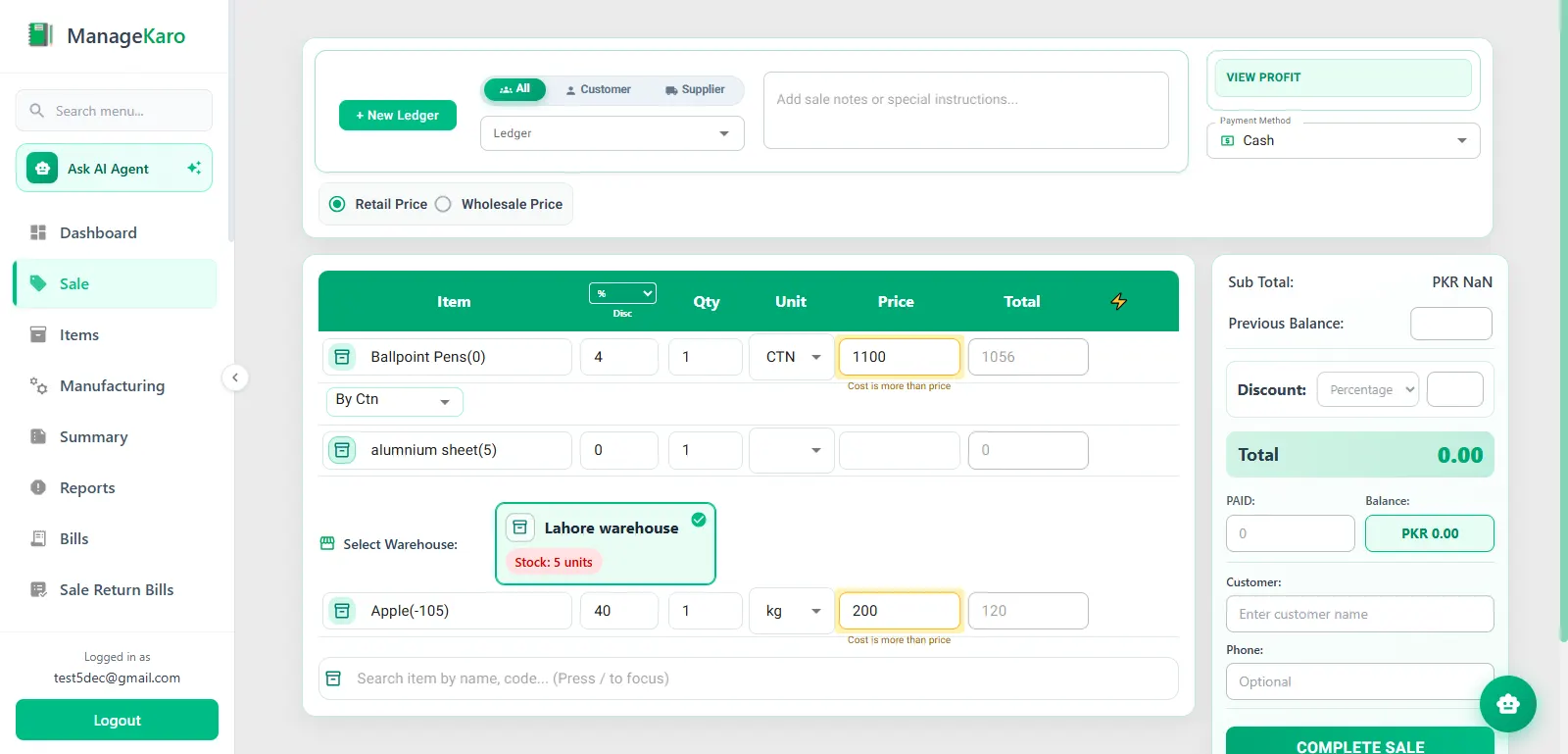
ManageKaro grocery POS checkout screen

Why a grocery counter needs more than a cash register

A grocery store sells hundreds of low-priced items to the same families every week. A register book and a calculator can't keep up with that.

Queues at peak hours

Most kiryana stores get their rush in the morning and again after office hours. When the cashier types prices from memory or checks a printed list, every bill takes longer. A customer with two items and a long queue in front of him often walks to the next shop.

Prices that change every week

In the week ended November 5, 2026, the Pakistan Bureau of Statistics recorded price changes on 31 of the 51 essential items it tracks. Twenty-one went up and ten came down. When the shelf, the cashier and the bill show different prices, you either lose margin or end up arguing at the counter.

Udhaar written in a notebook

Regular customers buy on credit and settle at the end of the month. A notebook can't tell you in a few seconds who owes what. One missed entry or torn page is money you won't get back.

Stock that doesn't match sales

You sell 40 packets of a biscuit in a week, but nobody updates the stock register. You find out it's gone when a customer asks for it. Our post on common inventory mistakes Pakistani shops make covers a few more of these.

What a grocery store POS system should do at the counter

A good grocery store POS system is one your cashier can run on a busy evening without calling you. Here is what matters most at a Pakistani grocery counter, and how ManageKaro handles it.

Barcode billing and product search

Scan packaged goods with a barcode scanner, or search your product list for the few items that don't carry a barcode. The price comes straight from your product list, so the cashier never has to remember it. If you haven't used a scanner before, our guide to barcode billing for retail stores explains how it works.

More than one counter

A supermarket with three tills needs all three selling from the same product list and stock count. The POS software supports multiple counters and branches, so each cashier bills from the same records and you see one total for the day.

Payments, discounts and receipts

Take cash, card or another supported payment method. Apply a discount when you're running one, and hand the customer an invoice or receipt.

Stock that drops with every sale

Every bill reduces the quantity on hand, so the system knows what is left on the shelf without a manual count. Our article on how POS sales and stock work together walks through it step by step.

The day's sales at closing time

At closing, see what sold, how much came in as cash and how much went on credit. If you aren't at the shop, you can check the day's sales from your phone.

Udhaar and regular customers, without the notebook

Most grocery stores in Pakistan run on regulars, and many of them pay at the end of the month. ManageKaro gives each customer a ledger that shows what they bought, what they paid and what they still owe.

When the cashier bills a credit sale, it goes straight to that customer's account, so the balance is current before he leaves the counter. When he pays some or all of it, you record the payment and the balance updates. Credit sales, cash sales and expenses all feed your daily book and cash book in the accounting and finance module, so month-end collections don't depend on reading someone's handwriting.

Price changes on atta, sugar, ghee and other staples

You change a price once in your product list, and every counter bills the new rate from the next sale. Nobody has to remember that sugar went up this morning, and nobody re-writes a price chart.

This matters more in a grocery store than in most shops. Staple prices move every week, and a few rupees' difference across hundreds of sales adds up by month end.

Loose items, weighing scales and carton-to-piece selling

If you sell a lot of loose items by weight, or buy by the carton and sell by the piece, talk to our team about how you'd set them up before you start your trial.

Billing when the internet goes down

Internet outages and load-shedding shouldn't stop your counter. ManageKaro's desktop client keeps processing sales offline and syncs your data to the cloud once the connection is back. What works offline can depend on how your setup is configured, so check the functions you rely on most during your trial.

Grocery POS software for every store size

Kiryana stores

A neighborhood kiryana store usually has one counter, one owner and a long list of regulars on credit. Fast billing and a clean udhaar ledger matter most here. The setup takes a computer, a barcode scanner and a receipt printer.

General stores

General stores mix groceries with toiletries, stationery and household goods. Everything sits in one product list with one stock count, the same way our retail POS system works for other shops.

Supermarkets

Supermarkets run several counters at once and keep extra stock in a back store or godown. Every counter bills from the same records, and the back-store side is covered by our grocery inventory management software, with products organized by warehouse, rack and sub-rack.

Cash and carry stores

Cash and carry stores sell in bulk to shopkeepers and hotels as well as walk-in buyers. Trade customers get their own ledgers, and orders that leave on a vehicle can go out with delivery challans.

Grocery chains with more than one branch

Each branch bills from its own counters, and you see sales for every branch in one place. When one branch runs short, you can transfer stock between locations instead of placing a rush order. If you want customers to order online, an online store can take those orders on the same system.

Hardware you need for a grocery POS

Most stores start with what they already own and add one or two pieces.

  • A computer or laptop for each counter
  • A barcode scanner
  • A thermal receipt printer
  • A cash drawer

If you aren't sure your current hardware will work, ask our team before you buy anything new.

How to choose the best POS system for a grocery store in Pakistan

The best POS system for a grocery store is the one that fits how your shop runs day to day. Check these points during any free trial, including ours.

  1. 01

    Time a real bill. Ring up ten mixed items during your evening rush and see how long it takes.

  2. 02

    Pull the internet cable. Make a sale offline, reconnect, and check that the sale and the stock count both synced.

  3. 03

    Look for udhaar inside the POS. Credit sales should go to the customer's account the moment they're billed. A separate app or notebook means entering everything twice.

  4. 04

    Test two counters at once. Both should sell from the same product list and the same stock.

  5. 05

    Add up three years of cost. Include setup fees, per-branch or per-counter charges, and annual renewals.

  6. 06

    Ask about FBR in writing. If your store is a Tier-1 retailer, get the vendor's integration status confirmed before you pay.

  7. 07

    Use your own products. Enter 50 of your best sellers and bill them. A demo with sample data won't show you the problems.

FBR and sales tax for grocery stores

FBR requires Tier-1 retailers to connect their point of sale to its system so each sale is reported as it happens. Under the definition as amended by the Finance Act 2026, you are Tier-1 if you meet any one of these tests: you are part of a national or international chain, you trade in an air-conditioned mall or plaza, your electricity bills topped Rs 1.2 million over the last 12 months, or your annual turnover is above Rs 200 million. FBR lists its POS rules for each category in its Sales Tax General Orders for Tier-1 retailers.

ManageKaro creates GST invoices, but FBR POS integration isn't part of the standard plans today. Many neighborhood kiryana stores don't meet any of the Tier-1 tests, but supermarkets in malls or with high electricity bills often do. If your store is Tier-1, or you aren't sure, talk to our team about your setup before you subscribe.

Grocery POS price in Pakistan

Many grocery POS plans in Pakistan bill every month, and some add a setup fee or charge again for each branch. ManageKaro has two plans, and both include every feature.

PlanPriceWhat you get
Free trial$0 for 3 daysEvery feature, no credit card
Annual$36 per yearEvery feature, priority support and regular updates
Lifetime$89, paid onceEvery feature, all future updates and no renewal fee

Hardware, internet and card payment charges are separate, as they are with any POS. See the pricing page for current plans.

Stock, accounts and staff behind the counter

The counter is only one part of running a grocery store. Because ManageKaro is one system, the rest of the work sits next to your sales:

For practical tips on billing, expiry dates and supplier purchases, read our guide to running a grocery store.

What a supermarket owner in Lahore says

"A super store has hundreds of items and customers all day, so speed at the counter really matters. ManageKaro's POS with barcode scanning has made checkout quick, and stock updates automatically with every sale. The Financial Management side is my favourite: daily book, expenses, supplier ledgers and udhaar balances all in one place. At the end of the day I know exactly what came in and what went out."
Madina Super StoreMadina Super Store, Umer Khan Road, Manawan, Lahore

Bill your first customer this week

Add your products, connect your scanner, and run a real evening shift on ManageKaro before you pay anything. If it doesn't suit your store, you've lost nothing.

Talk to our team

Frequently Asked Questions

A grocery POS system is the software and hardware at your checkout. It bills items by barcode or search, records how the customer paid, prints a receipt and reduces stock for every item sold. In Pakistan, a good one also keeps udhaar on each regular customer's account.

For a small kiryana store, look for fast barcode billing, a built-in udhaar ledger, billing that keeps working when the internet drops, and a price that suits a one-counter shop. ManageKaro covers all four for $36 a year. Test any system with your own products before you pay.

It depends on the provider. Some charge every month, some add a setup fee, and some charge extra for each branch. ManageKaro costs $36 a year or $89 once for lifetime access, with every feature included. Hardware such as scanners and printers is a separate cost.

A few free POS apps exist, but they usually limit features or make money from add-ons and payment fees. ManageKaro isn't free. It has a 3-day free trial with every feature and no credit card, then costs $36 a year.

Yes. In ManageKaro, every customer has a ledger. Credit sales go to that ledger when they're billed, and payments reduce the balance, so you can see who owes what at any time.

Yes, on the desktop client. It keeps processing sales while you're offline and syncs your data to the cloud once the connection comes back. Check the functions you use most during your trial, since offline features can depend on your setup.

Yes. ManageKaro supports multiple counters and branches. Every counter bills from the same product list, and you can move stock from one branch to another.

Not in the standard plans today. ManageKaro creates GST invoices, but FBR POS integration isn't included. If your store is a Tier-1 retailer, contact our team before you subscribe.

Most stores need a computer or laptop for each counter, a barcode scanner, a thermal receipt printer and a cash drawer. You can often start with hardware you already have. Ask our team which models work before you buy anything new.