Retail Store Owners
Check sales during the day from home or from another shop, and see low stock before you place the next order. Retailers who want counter billing as well can start with ManageKaro's retail POS system.
 Backed by NVIDIA Inception
ManageKaro gives you mobile inventory and POS access through the browser already on your phone. Sign in with your usual ManageKaro account to check stock in each warehouse, see which products are running low, and review today's sales while you are away from the counter. There is no separate app to download.
Your phone opens the same cloud system your counter and office use. The stock figure on your screen is the one your staff see at the shop, and the sale your cashier just billed is already in your sales records.
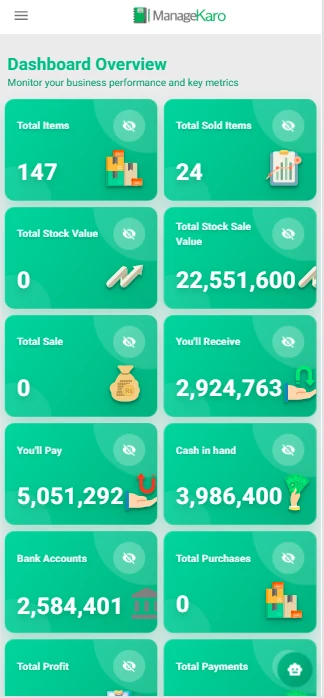
Most stock questions come up when you are not standing in the godown. A customer calls to ask whether you have 20 cartons of an item. A supplier's rep wants to know what to send next week. With ManageKaro's mobile inventory access, you open the product on your phone and answer, instead of calling the shop and waiting for someone to count.
The stock you see on your phone comes from the same records as the full inventory management software, so there is no separate list to keep up to date.
A wholesaler takes an order over the phone, opens the product, sees 140 units at the main godown and 30 at the shop, and confirms a delivery date on the same call.
A store manager checks the low-stock list on the way to the market and buys what is actually short, not what someone remembers being short.
An owner looks over the day's stock movement in the evening without asking anyone to prepare a report.
Setting up a large product list or entering a long purchase bill is still quicker on a laptop or desktop. The phone is where you check, follow up, and make decisions between those bigger tasks.
People searching for mobile POS software usually want one of two things: to see what is selling while they are away, or to bill customers without a fixed counter. ManageKaro's mobile access covers the first in full. Billing at the counter runs through the POS software, and every sale it records lands in the same cloud account your phone opens.
Because POS and inventory share one set of records, a sale at the counter reduces stock straight away. When you check a fast-moving item on your phone in the afternoon, the quantity already reflects the morning's sales.
ManageKaro's mobile access is designed for keeping an eye on sales, not for replacing your billing counter. Fast counter billing with barcode scanning, receipt printing, and offline sales through the desktop client is set up through the POS module. If you plan to bill customers from a phone or tablet, ask our team to show you that workflow in a demo before you rely on it.
Once a business has a shop and a godown, or two branches, the hard question is rarely "how much stock do we have?" It is "where is it?" ManageKaro records quantities by location, so your phone shows the breakdown for each warehouse and branch, not just one total.
That helps when you need to:
Check whether the main warehouse can fill a large order before you confirm it
Spot a branch running out of a fast seller while another branch holds extra
See what was transferred between locations, and when
Find a shortage at one branch before the weekend rush
Transfers, rack organization, and location setup live in the inventory module. Your phone gives you the view you need to manage inventory across warehouses without being at any one of them.
ManageKaro is one cloud system made of modules that share the same records. When you sign in on your phone, you switch between them from the same account.
| Module | What you can see or do from your phone |
|---|---|
| Accounting and finance | Sales, expenses, income, customer ledgers, cash flow, profit and loss |
| HR and payroll | Employee records, attendance, leave, salaries, advances, payslips |
| Delivery management | Delivery challans, dispatch status, delivery documents |
| Online store | Product catalog, orders, availability linked to inventory |
A POS sale updates stock and your financial records together, so the numbers on your phone do not need checking against a separate register. You can see how every module fits together on the ManageKaro features page.
Open the web browser on your phone or tablet.
Go to the ManageKaro login page and sign in with the same account details you use on your computer.
Pick the module you need: inventory, POS and sales, finance, HR, delivery, or online store.
Check what you came for, whether that is a stock level, today's sales, a customer balance, or a delivery.
Optional: add ManageKaro to your home screen so it opens with one tap. On an iPhone, use Safari's Add to Home Screen option. On Android, use Chrome's create shortcut option.
A smartphone or tablet with an up-to-date web browser
An internet connection. Mobile access works online. If your counter needs to keep billing when the internet drops, the POS desktop client handles offline sales and syncs with the cloud once you reconnect.
Your ManageKaro login. Team members see what the access you give them allows.
The interface is responsive, so pages adjust to phone and tablet sizes. You get the information you need to act on without zooming around a desktop layout.
ManageKaro does not need a separate mobile app. The system is hosted in the cloud and your phone's browser opens it. That keeps things simple in a few practical ways:
Nothing to download before you start. You can try ManageKaro on your phone on the first day of your free trial.
Updates happen centrally, so you are not installing new versions on every staff phone.
There is one set of business records. Nothing has to be exported from a phone app or imported into your desktop system.
The same account works on a phone, a tablet, a laptop, or the shop computer.
Check sales during the day from home or from another shop, and see low stock before you place the next order. Retailers who want counter billing as well can start with ManageKaro's retail POS system.
Confirm stock against an order while you are on a call or visiting a customer, then follow the delivery challan through dispatch. See how ManageKaro handles inventory for distributors.
Compare stock and sales across branches without visiting each one, and catch a branch that is running short before customers notice.
Look up an item's quantity and rack location on the floor instead of walking back to a desktop.
Review the day's sales, expenses, and cash position in the evening, wherever you are.
Check attendance and sales activity by counter while you move between the shop floor and the office.
Answers without phoning the shop. Stock, sales, and balances are on your phone when the question comes up.
One record on every screen. Your phone, the counter, and the office all read the same cloud data.
Sales and stock stay linked. Each POS sale reduces inventory, so what you see on your phone matches what is on the shelf, as long as sales are billed through the system.
Every module in every plan. Inventory, POS, finance, HR, delivery, and online store are all included. There is no separate mobile plan.
Clear pricing. $36 per year, or $89 once for lifetime access.

“With a large workforce at Kot Lakhpat, salaries, advances and leave records used to take our team days every month. Since moving to ManageKaro’s HR module, attendance and payroll run smoothly and payslips go out on time without endless Excel sheets. The Financial Management side has been just as useful: expenses, ledgers and cash flow sit in one place, and P&L reports are ready whenever management asks. Month-end is honestly far less stressful now. A solid Pakistani product that delivers.”

“Pehle sab kuch register mein likha hota tha aur stock ka kabhi pata nahi chalta tha. ManageKaro’s POS changed that for us. Barcode scan karo, bill ready, and the customer gets it on WhatsApp too. Low-stock alerts mean we reorder before items run out, so no customer goes back empty-handed. Even when the internet goes off in Rasool Pur, the counter keeps working without any issue. For a trader like us, the price is very reasonable. Faisalabad ke dukandaron ko zaroor try karna chahiye.”

“In spare parts, keeping track of thousands of small items is the hardest job. ManageKaro’s rack and sub-rack system fixed that; my staff now finds any part in seconds instead of searching the whole godown. We also launched our own online store, and mechanics from other areas order directly from there. Delivery challans and dispatch status are all tracked, so no more ‘parcel kahan hai’ calls. Our business on Kacha Ravi Road has really grown. Shukriya, ManageKaro team!”

“Hall Road pe din bhar rush hota hai, and in electronics every item has its own model and price. ManageKaro’s POS keeps the counter moving: scan, bill, done, whether the customer pays cash, card or bank transfer. Stock across our shop and godown stays updated, and transfers are easy to record. I can check daily sales from my phone even when I’m away from the shop. Simple software, honest pricing, and their WhatsApp support always responds quickly. Bohat acha experience raha hai.”
— Owner, Ashraf Son’s International

“Sanitary ke kaam mein pipes, fittings aur taps sab alag sizes mein hotay hain, and managing that stock was a real headache. ManageKaro sorted it out. Every item is in the system, low-stock alerts warn us early, and counter billing is quick. For contractors and home orders, delivery challans are made in a minute and we track every dispatch until it reaches the site. Bahawalpur mein itna acha system milna mushkil hai. Our hisaab kitaab is finally clean now, Alhamdulillah.”

“A super store has hundreds of items and customers all day, so speed at the counter really matters. ManageKaro’s POS with barcode scanning has made checkout quick, and stock updates automatically with every sale. The Financial Management side is my favourite: daily book, expenses, supplier ledgers and udhaar balances all in one place. At the end of the day I know exactly what came in and what went out. Manawan ke dukandaron ko zaroor recommend karunga. Great value for money.”
“ManageKaro has made it easier for us to manage our daily business activities. Its POS and billing, inventory management, and financial management features help us keep our sales and inventory records better organized. Having these essential business functions available in one platform makes our everyday operations more convenient. We particularly appreciate how ManageKaro helps simplify billing and maintain organized business records. It has been a useful solution for managing our machinery business more efficiently.”
“ManageKaro has helped us bring important parts of our business management together. We use its POS and billing, inventory management, and financial management features to handle our daily operations. The system has given us better control over product sales and stock while helping us keep our business activities more organized. Having billing, inventory, and financial management connected in one platform makes it easier to manage our day-to-day work. ManageKaro has been a helpful addition to the way we manage our machinery store.”
Mobile inventory software lets you look up products, stock levels, and where stock is kept from a phone or tablet. ManageKaro provides this through your phone's browser, connected to the same inventory records your counter and office use.
Yes. You can check products, quantities, low-stock items, stock by warehouse and branch, and recent transfers. Bulk work, such as setting up a large product list, is easier on a laptop or desktop.
Yes. ManageKaro keeps quantities by location, so you can see how much stock each warehouse, branch, or godown holds from the same screen.
From your phone you can follow sales, invoices, payments, and customer balances as they are recorded. Counter billing runs through the point of sale module. If you want to bill from a phone, ask for a demo of that workflow first. For a general overview of the topic, read our guide to mobile POS systems for small businesses.
No. ManageKaro opens in your phone's web browser. Sign in with your existing account and you are using the same system as on your computer.
No. Mobile access needs an internet connection. For counters that must keep billing during an outage, the POS desktop client supports offline sales and syncs with the cloud when the connection returns.
Yes. There is one cloud system and one set of records. Whatever device you sign in on, you are looking at the same stock, sales, and accounts.
Each sale billed through the POS reduces the stock of the items sold. That is why the stock levels you check on your phone already reflect the day's sales.
Start the 3-day free plan, with no credit card needed. Sign in from your phone on the first day and check your stock, sales, and balances the way you would on a normal working day. All features are included in the trial. Afterwards you can choose the Annual plan at $36 per year or Lifetime access at $89 as a one-time payment.