Online Store Management Software for Shops and Retail Businesses
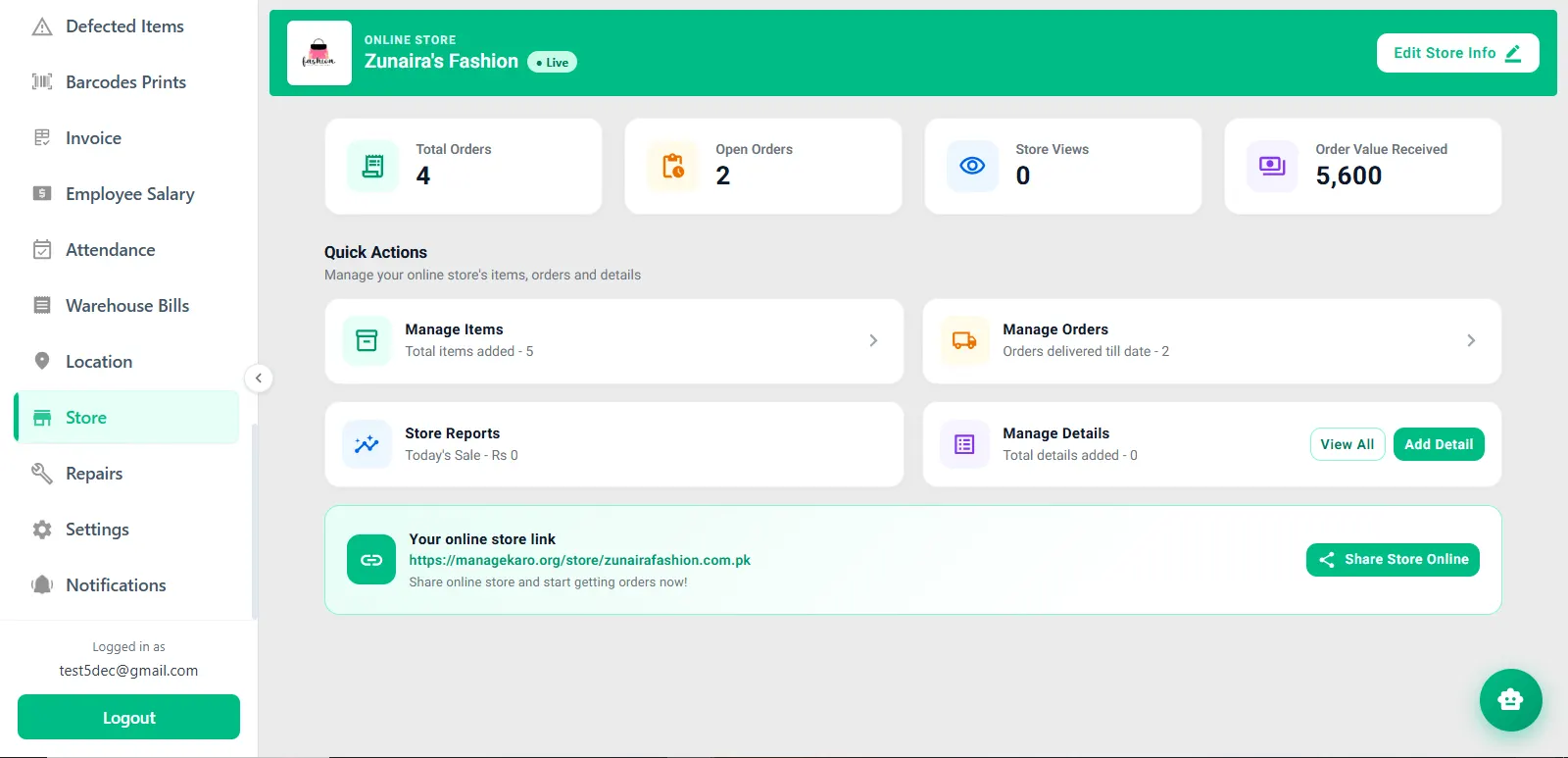
ManageKaro's Online Store Module turns the products you already sell into an online store with its own link. Customers browse and place orders there, and you manage those orders in the same account that runs your counter, your stock, and your deliveries.
It's built for shops, wholesalers, distributors, and small product businesses that already take orders over WhatsApp and phone and want them in one place. You don't keep a second product list for the website, and you don't copy online orders into a register at the end of the day.
The Free Plan gives you 3 days with every ManageKaro feature and needs no credit card. After that, plans start at $36 a year. See plans
3-day Free Plan, no credit card
Your own store link
One product list for your shop and your online store
Orders, stock, and deliveries in one account
Selling Online Shouldn't Mean Running a Second Business
Most shops start selling online the same way. You post product photos on your WhatsApp status or Facebook page, customers message to ask the price, and someone writes the order down. It works until the messages pile up.
Then the problems start. A customer orders the last three pieces of an item that sold at the counter an hour ago. A phone order never reaches the godown. Nobody can say which parcels went out today.
Customers are ready to buy online: the State Bank of Pakistan counted 434.5 million online purchases paid through bank accounts and wallets between January and March 2026, according to its Payment Systems Quarterly Review. What holds most shops back isn't the storefront. It's keeping online orders in step with the stock and records the shop already depends on.
That's the gap ManageKaro's online store management software is built to close. Your online store works from the same product catalog and inventory as your POS software, so the store customers see and the shop you run stay in one business.
How a Shop Starts Selling Online With ManageKaro
You don't need a developer, a separate hosting plan, or an ecommerce website built from scratch. Unlike an online store builder that starts with a blank website, ManageKaro starts with the products your business already sells. Here's what setting up and running the store looks like from the owner's side.
1
Set up your business.
Create your ManageKaro account and add the products you sell, with their prices and stock. If you already bill or manage stock in ManageKaro, this step is done.
2
Create your online store and seller profile.
Your storefront is built from your existing product catalog, and your seller profile tells customers which business they're buying from.
3
Keep your catalog current.
Add new arrivals and update details from your dashboard as your range changes, the same way you manage products for the counter.
4
Share your store link.
Every store gets its own link. Send it to regular customers on WhatsApp, pin it on your Facebook page, print it on your visiting card, and add it as the website on your Google Business Profile so people who find your shop on Google Maps can order too.
5
Receive orders.
Customers browse your products and place orders directly through the store. Each order lands in your ManageKaro dashboard instead of a chat thread.
6
Pack and deliver.
Confirm the order, prepare it, and follow it through delivery until you mark it complete.
7
Review the business.
Online orders sit alongside your counter sales and stock, so you can check how things are going from the shop, the godown, or your phone.
Online Store Management Features
These are the tools you use day to day for ecommerce store management in ManageKaro. Everything below is part of the Online Store Module unless it says it comes from another ManageKaro module.
An Online Storefront With Your Own Store Link
The storefront shows your products to customers at a link that belongs to your business. A WhatsApp catalog or a Facebook album can show products too, but the order still ends up as a chat message that someone has to read, copy, and check against stock. With a store link, the customer places the order themselves, and you receive it as an order rather than a conversation.
A Seller Store Profile Customers Can Trust
Your seller profile is your shop's identity inside the online store: the business name and details that tell customers who they're dealing with. For a home-based seller with no signboard, or a dealer selling to buyers in other cities, the profile does the job a shop front does on the street.
Product Catalog Management
Add products, update their information, and keep the online catalog organized from your ManageKaro dashboard. Because ManageKaro keeps products in one central catalog rather than in duplicate records, you aren't maintaining a website product list and a billing product list side by side. That double entry is usually where the wrong price or the discontinued item on a shop's website comes from.
Online Order Management
Orders placed through your store come into ManageKaro, where you can view them, update their status, and follow them through fulfillment. Instead of scrolling back through chats to find what a customer asked for, each order has its own record. When a customer calls to ask about it, you can answer from the dashboard rather than from memory.
Inventory Connected to Online Sales
The online store is connected to ManageKaro's inventory management, so stock records stay aligned with what you sell online as well as at the counter. If you hold stock in more than one godown or branch, the inventory module already tracks it by location and records transfers between them. This is what lets a shop take orders online without promising items it no longer has.
Order Tracking and Delivery
Follow each online order through packing and dispatch, and mark it delivered when it reaches the customer. Businesses that send goods with their own vehicles or riders can add delivery management, which creates delivery challans and gate passes and tracks each delivery as pending, dispatched, or completed. That record answers the "where is my parcel?" call before it turns into three more.
Connected Business Operations
The online store is one module in ManageKaro's all-in-one business management software. POS billing, inventory, accounting (Daily Book, customer ledgers, expenses, and profit and loss), HR and payroll, and delivery management all live in the same account. You use the parts your business needs, without exporting data from one app and importing it into another, so online sales management becomes part of the daily routine rather than a separate job.
Manage Online and In-Store Sales Together
Running a counter and an online store from separate systems means two stock counts that slowly drift apart. ManageKaro keeps both channels on one product catalog and one set of inventory records.
Here's how that plays out on an illustrative day. A clothing shop has 10 pieces of a blue lawn suit in stock. By noon, the counter sells 4 through ManageKaro POS, and inventory shows 6. That evening, a customer in another city ordered 2 through the shop's store link. The order is recorded against the same stock, so the shop isn't offering pieces that left through the front door hours earlier. The next morning, the owner sees counter sales, the online order, and the remaining stock in one place.
Running both channels in one system gives you:
One product catalog for the counter and the online store
One stock record per location, updated by counter sales and connected to online orders
Counter sales and online orders in the same account
Delivery status for orders that leave the shop
Access from your shop computer or your phone
One honest caution: software can only be as accurate as the records behind it. If stock arrives or gets adjusted without being entered, both your counter and your online store will show the wrong numbers until it is. A regular physical count still matters.
The module suits businesses that already have stock, customers, and a way of selling, and want online shop management that fits into it.
Retail Shops
Clothing, cosmetics, electronics, and general stores use the store link to let regular customers reorder without visiting or calling. A customer who bought a charger last month can open the link, see what's in stock, and order a second one. If you're choosing a counter system too, see ManageKaro's retail POS system.
Parts and Hardware Dealers
Yasin Auto & Spare Parts in Lahore launched its own online store through ManageKaro so mechanics in other areas can order directly. For a dealer whose buyers are workshops across the city, that replaces a long list of daily phone orders. Our page on stock control for spare parts shops covers the stock side.
Wholesalers and Distributors
Retailers you supply can browse your range and place orders through your store link instead of calling your office. Those orders sit in the same system as your godown stock and delivery challans. One thing to know first: ManageKaro has no order booker app, route plans, or van stock by salesman, so if your sales depend on field order bookers, read how our inventory software for distributors handles that before you decide.
Small and Home-Based Sellers
If you sell from home or through social media, the store link and seller profile give customers one place to see everything you offer. You keep simple records of what was ordered and what was delivered, and the whole platform costs $36 a year after the trial.
Traditional Shops Taking Their First Step Online
If you've never sold online, start with the products you already stock and the customers who already know you. Share the link with them first, learn how orders come in, and add more products as you go. There's no website to commission and no separate online store software to learn.
Why Choose ManageKaro for Online Store Management?
The Online Store Is Part of Your Business, Not Bolted On
ManageKaro starts from the records your shop already keeps (products, stock, sales, and deliveries) and adds the storefront to them, instead of starting with a website and connecting the shop to it later. That order matters for a shop where most sales still happen at the counter.
One Product List, One Stock Record
You maintain products once, in one catalog, and the online store and POS work from it. That removes a common reason online stores show wrong prices and sold-out items.
Deliveries and Accounts in the Same Account
When an order leaves the shop, delivery challans and dispatch status can be recorded in ManageKaro's delivery module. Your Daily Book, customer ledgers, and profit and loss sit in the accounting module of the same account, so the online side doesn't need its own spreadsheet.
Published Pricing
The price is on the website: $36 a year, or $89 once for lifetime access, each with access to all features. You can see the cost of the whole platform before you talk to anyone.
Built for How Shops in Pakistan Sell
ManageKaro is built for Pakistani retailers, wholesalers, and distributors who juggle a counter, a godown, WhatsApp orders, and credit customers. The online store fits that routine rather than asking you to run your business like an online-only brand.
When a Dedicated Ecommerce Platform May Suit You Better
If your business is online-only and your plans depend on custom store design, card checkout, marketplace syncing, or international shipping, a dedicated ecommerce platform is built around those jobs. ManageKaro's online store is built for businesses whose online orders need to stay tied to a physical shop, its stock, and its delivery records. If you're not sure a feature you need is included, ask our team before you start.
ManageKaro vs. Running an Online Store With Separate Tools
If you're comparing ecommerce management software, the difference shows up in daily work. This table compares two ways of running the same shop, not specific products.
Daily task
With separate tools
With ManageKaro
Product list
Kept in a website builder, a WhatsApp catalog, and billing software, each updated by hand
One product catalog used by the online store and POS
Price changes
Changed in each place, and often missed in one
Changed once in the central catalog
Stock
Website stock and shop stock drift apart until someone counts
Online store connected to the same inventory records as counter sales
Online orders
Spread across chats, calls, and a separate store dashboard
Received and managed in your ManageKaro dashboard
Counter sales
In a separate POS or a paper register
POS billing in the same account
Deliveries
Tracked through phone calls and notebooks
Order status in the online store; challans and gate passes in Delivery Management
Accounts
Re-entered into a khata or spreadsheet
Daily Book, ledgers, expenses, and profit and loss in the accounting module
ManageKaro isn't a free-forever online store. It's a low-cost business platform you can try free before you pay anything.
Free Plan
$0for 3 days
Access to all features and no credit card required.
Annual Plan
$36per year
Works out to $3 a month, with all features, priority support, and regular updates.
Lifetime Access
$89one-time payment
All features, priority support, all future updates, and no recurring fees.
During the 3 days, you can set up your products, create your store, and see how online orders fit alongside your counter sales and stock. To keep using ManageKaro after the trial, choose the Annual or Lifetime plan. No setup fee is listed on the pricing page, and prices are shown in US dollars.
If all you need is a free page to show a few products, a free catalog tool may be enough for now. ManageKaro makes sense when those orders need to connect to your stock, billing, and deliveries.
“In spare parts, keeping track of thousands of small items is the hardest job. ManageKaro’s rack and sub-rack system fixed that; my staff now finds any part in seconds instead of searching the whole godown. We also launched our own online store, and mechanics from other areas order directly from there. Delivery challans and dispatch status are all tracked, so no more ‘parcel kahan hai’ calls. Our business on Kacha Ravi Road has really grown. Shukriya, ManageKaro team!”
“With a large workforce at Kot Lakhpat, salaries, advances and leave records used to take our team days every month. Since moving to ManageKaro’s HR module, attendance and payroll run smoothly and payslips go out on time without endless Excel sheets. The Financial Management side has been just as useful: expenses, ledgers and cash flow sit in one place, and P&L reports are ready whenever management asks. Month-end is honestly far less stressful now. A solid Pakistani product that delivers.”
Modules usedFinancial ManagementHR Management
Zohan Traders
Rasool Pur, Faisalabad
“Pehle sab kuch register mein likha hota tha aur stock ka kabhi pata nahi chalta tha. ManageKaro’s POS changed that for us. Barcode scan karo, bill ready, and the customer gets it on WhatsApp too. Low-stock alerts mean we reorder before items run out, so no customer goes back empty-handed. Even when the internet goes off in Rasool Pur, the counter keeps working without any issue. For a trader like us, the price is very reasonable. Faisalabad ke dukandaron ko zaroor try karna chahiye.”
Modules usedPOS & Inventory Management
Ashraf Son’s International
Hall Rd, Garhi Shahu, Lahore
“Hall Road pe din bhar rush hota hai, and in electronics every item has its own model and price. ManageKaro’s POS keeps the counter moving: scan, bill, done, whether the customer pays cash, card or bank transfer. Stock across our shop and godown stays updated, and transfers are easy to record. I can check daily sales from my phone even when I’m away from the shop. Simple software, honest pricing, and their WhatsApp support always responds quickly. Bohat acha experience raha hai.”
— Owner, Ashraf Son’s International
Modules usedPOS & Inventory Management
Al-Harmain Sanitary Store
Madina Town, Bahawalpur
“Sanitary ke kaam mein pipes, fittings aur taps sab alag sizes mein hotay hain, and managing that stock was a real headache. ManageKaro sorted it out. Every item is in the system, low-stock alerts warn us early, and counter billing is quick. For contractors and home orders, delivery challans are made in a minute and we track every dispatch until it reaches the site. Bahawalpur mein itna acha system milna mushkil hai. Our hisaab kitaab is finally clean now, Alhamdulillah.”
“A super store has hundreds of items and customers all day, so speed at the counter really matters. ManageKaro’s POS with barcode scanning has made checkout quick, and stock updates automatically with every sale. The Financial Management side is my favourite: daily book, expenses, supplier ledgers and udhaar balances all in one place. At the end of the day I know exactly what came in and what went out. Manawan ke dukandaron ko zaroor recommend karunga. Great value for money.”
“ManageKaro has made it easier for us to manage our daily business activities. Its POS and billing, inventory management, and financial management features help us keep our sales and inventory records better organized. Having these essential business functions available in one platform makes our everyday operations more convenient. We particularly appreciate how ManageKaro helps simplify billing and maintain organized business records. It has been a useful solution for managing our machinery business more efficiently.”
Modules usedPOS and BillingInventory ManagementFinancial Management
Super Machinery Store
Machinery Retailer · Rawalpindi, Pakistan
“ManageKaro has helped us bring important parts of our business management together. We use its POS and billing, inventory management, and financial management features to handle our daily operations. The system has given us better control over product sales and stock while helping us keep our business activities more organized. Having billing, inventory, and financial management connected in one platform makes it easier to manage our day-to-day work. ManageKaro has been a helpful addition to the way we manage our machinery store.”
Modules usedPOS and BillingInventory ManagementFinancial Management
Frequently Asked Questions About Online Store Management Software
Online store management software lets a business set up an online storefront, manage the products shown there, and receive and process the orders customers place. ManageKaro adds that to the same system that handles POS billing, inventory, accounting, and deliveries, so online orders aren't managed in isolation.
Yes. The online store is built from the products already in your ManageKaro account. You set up your seller profile, get a unique store link, and share it with customers. No coding or separate website is needed.
You add and update products from your ManageKaro dashboard. The online store and POS use the same central product catalog, so you aren't maintaining two product lists.
Yes. Customers place orders through your store link, and the orders arrive in ManageKaro. You can view each order, update its status, and track it through delivery.
Yes. The online store is connected to ManageKaro's inventory, and counter sales through ManageKaro POS update the same stock records. If you hold stock in several warehouses or branches, the inventory module tracks it by location.
Yes. POS billing and the online store are modules in the same ManageKaro account, along with inventory, accounting, HR, and delivery management. You log in once to see both channels.
Yes. Small shops and home-based sellers use it to sell online without building a website. After the 3-day Free Plan, the Annual Plan costs $36 a year for the whole platform.
Yes. Retailers you supply can order through your store link, and those orders sit alongside your stock and delivery challans. ManageKaro doesn't include an order booker app, route plans, or van stock, so field-sales teams should check that first.
Not permanently. The Free Plan gives you 3 days with access to all features, including the online store, with no credit card required. After that, you choose the Annual Plan at $36 a year or Lifetime Access at $89 one time.
To keep selling through your store, choose the Annual or Lifetime plan. Both include access to all features. If you have questions about your account or data before you decide, contact our team.
Yes. ManageKaro works across supported devices, so you can check orders, products, and stock away from your shop computer. See mobile access for details.
Put Your Shop Online Without Starting From Scratch
Your products, your stock, and your customers are already there. Give them a store link, take orders in the same place you bill and track stock, and see how it works for your shop over 3 days.