POS Software in Pakistan for Retail, Wholesale & Growing Businesses
Manage your sales, billing, inventory, and business finances with ManageKaro, an all-in-one POS software solution for Pakistani businesses. Process customer transactions, generate invoices, track stock, record payments, and monitor business performance from one connected platform.
Whether you operate a retail shop, grocery store, cash and carry business, wholesale operation, or multiple branches, ManageKaro helps you manage more than just checkout. Connect your point of sale with inventory, customer records, financial management, and other essential business operations.
Key benefits of ManageKaro POS:
Fast product search, barcode-based workflows, and sales billing.
Connected POS and inventory management.
Cash, card, and other supported payment methods.
Digital invoices and transaction records.
Sales reports and business performance visibility.
Customer transaction records and account information.
Support for multiple counters and business locations.
Integrated business management tools in one platform.
Start with a 3-day free trial and explore ManageKaro before choosing a paid plan.
POS Software Built for the Everyday Needs of Pakistani Businesses
Running a retail or wholesale business involves much more than completing customer transactions. You need to manage product availability, track incoming stock, monitor sales, handle customer payments, maintain financial records, and understand how your business is performing.
When these activities are managed through separate applications, spreadsheets, or manual records, information can become fragmented. Employees may need to enter the same transaction more than once, and business owners may struggle to get a clear picture of daily operations.
ManageKaro brings these activities together through a connected business management platform.
Its POS module helps your team process sales and generate invoices, while the wider platform connects sales information with inventory, customer records, financial management, and other business functions.
For example, when your team completes a sale, the transaction can be connected to the relevant stock and business records. This reduces the need to manage billing and inventory as completely separate activities.
What Makes ManageKaro Different From a Basic POS System?
A standalone POS application primarily focuses on billing and payment collection. However, a growing business also needs to understand what happens before and after a sale.
ManageKaro combines several important business functions:
POS and billing: Process customer transactions and maintain sales records.
Inventory management: Manage products, stock quantities, warehouses, and stock movements.
Financial management: Organize financial information, payments, expenses, and ledgers.
Customer management: Maintain customer information and transaction records.
HR management: Organize employee information and staff-related operations.
Delivery management: Manage delivery information and related business documents.
Instead of switching between disconnected tools, your team can manage these business activities within one platform.
The result is a more connected way to manage everyday operations, from the sales counter to inventory and financial records.
Complete POS Features for Sales, Billing, and Business Management
Choosing the right POS software means looking beyond the ability to generate a bill. Your business needs a system that supports daily transactions, keeps sales information organized, and helps you manage related operations.
ManageKaro provides the following POS capabilities.
01
1. Fast POS Billing and Checkout
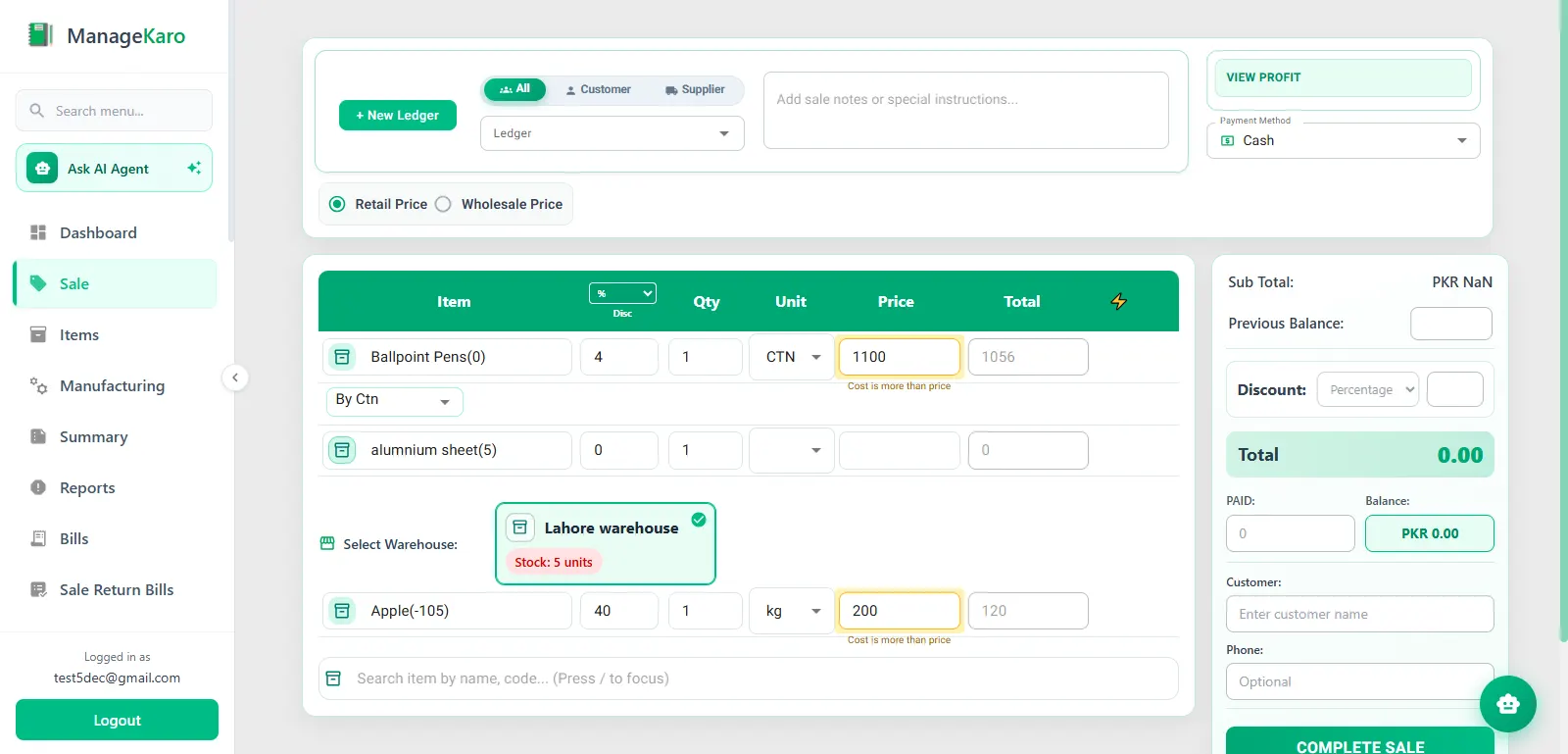
Process customer purchases through a digital billing interface. Search for products, add items to a transaction, review quantities, calculate totals, apply supported discounts, and complete sales without relying on handwritten calculations.
A digital billing workflow can help your staff handle everyday checkout more consistently, especially during busy business hours.
Useful for: Retail counters, grocery stores, cash and carry businesses, and other product-based businesses.
02
2. Product Search and Barcode-Based Billing
Finding the right product should not slow down the checkout process.
ManageKaro supports product search and barcode-based workflows, helping employees identify products and add them to customer transactions.
This can be especially useful for stores managing large product catalogs or selling multiple product variations.
Useful for: Supermarkets, grocery stores, electronics shops, clothing stores, and other retailers with extensive inventories.
03
3. Multiple Payment Methods
Customers may prefer different payment methods depending on the transaction and their preferences.
ManageKaro POS supports cash, card, and other supported payment methods, allowing your team to record how customer transactions are paid.
Maintaining organized payment records also makes it easier to review sales and reconcile business transactions.
CashCardOther
CashRs 3,000
CardRs 1,000
04
4. Digital Invoices and Sales Records
Replace handwritten sales slips with digital invoices and organized transaction records.
ManageKaro helps you create invoices and maintain a record of completed sales. Digital transaction information also makes it easier to retrieve previous sales when you need to review a purchase or check billing details.
INVOICE #1043Paid
Basmati Rice 5kg ×22,400
Cooking Oil 1L ×1680
TotalRs 3,080
05
5. Connected Inventory and Stock Management
Your sales counter and inventory are two parts of the same business.
When a product is sold, the related stock information should remain connected to the transaction. Otherwise, employees may need to update inventory separately, increasing the risk of inconsistent records.
ManageKaro connects POS activity with its inventory management functionality, helping businesses maintain more organized sales and stock information.
You can manage products, monitor stock quantities, and review inventory information through the connected platform.
Recording sales is important, but understanding sales activity is equally valuable.
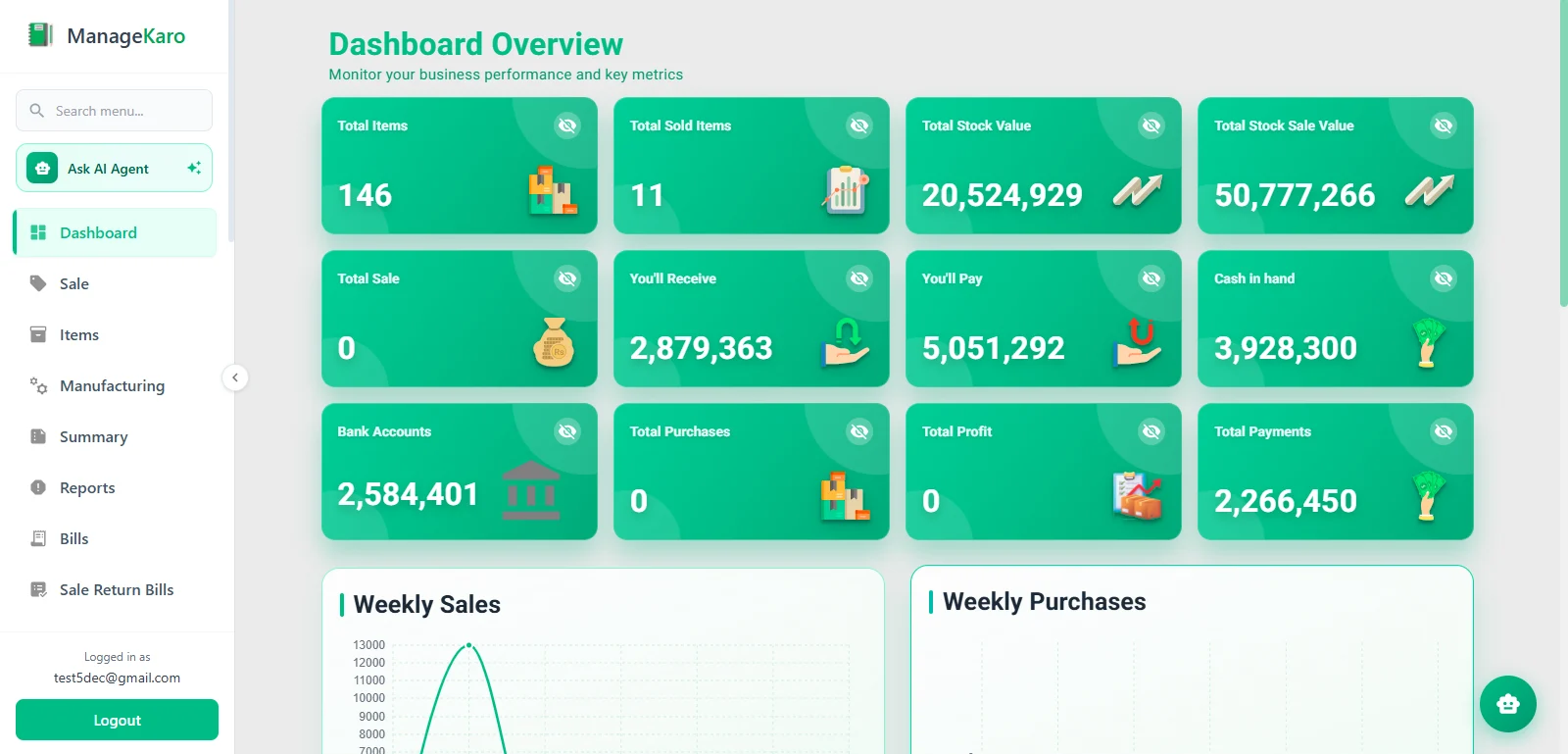
ManageKaro helps you review sales information and business activity through its reporting and management functionality.
Use your available sales records to understand:
Daily sales activity.
Weekly and monthly sales trends.
Frequently sold products.
Transaction history.
Sales performance across supported counters or locations.
These insights can help business owners make more informed decisions about inventory, purchasing, and everyday operations.
07
7. Multiple Counters and Branch Management
Businesses with more than one sales counter or location need a way to organize transactions across their operations.
ManageKaro supports multiple counters and branches, helping businesses manage sales activity through a connected platform.
This is particularly useful for businesses that need visibility beyond a single checkout terminal.
Main Store · Counter 1Rs 48,200
Main Store · Counter 2Rs 39,850
Branch 2 · Counter 1Rs 40,350
08
8. Customer Records and Transaction History
Customer information can be valuable when managing repeat purchases, outstanding balances, and business relationships.
ManageKaro connects customer information with business operations, helping you maintain more organized customer and transaction records.
Depending on your business workflow and configured features, customer information can support better visibility into previous purchases and related transactions.
09
9. Offline Sales Support
An internet interruption should not automatically bring every business activity to a halt.
ManageKaro's desktop client supports offline sales processing and synchronizes data with the cloud after the internet connection is restored.
This can help businesses continue eligible POS activities during temporary connectivity problems.
Before relying on offline functionality, test the workflows that matter to your business, including payment recording, invoice creation, product availability, and synchronization after reconnecting.
How ManageKaro POS Connects a Sale With Your Business Operations
A customer purchase is not just a payment at the counter. It creates information that may be relevant to inventory, customer records, financial management, and sales reporting.
ManageKaro is designed to connect these activities instead of treating every transaction as an isolated billing event.
Here is how a typical product sale can flow through the system.
01
Step 1: Find and Select Products
Your employee searches for a product or uses the supported barcode workflow to add the required items to the customer's transaction.
02
Step 2: Review the Bill
The POS calculates the transaction total based on the selected products, quantities, and applicable discounts.
03
Step 3: Record the Payment
Your employee records the payment using an available payment method, such as cash, card, or another supported option.
04
Step 4: Generate the Invoice
The completed transaction is recorded, and the relevant invoice or receipt is generated.
05
Step 5: Update Related Inventory Records
The sale is connected to inventory management so that the corresponding stock information can be updated through the supported workflow.
06
Step 6: Maintain Customer and Financial Records
Related transaction information can be used within the relevant customer and financial management workflows, helping keep business records organized.
07
Step 7: Review Sales Information
Business owners can review available transaction and sales information to understand daily activity and monitor business performance.
Why does this matter?
With a connected POS system, you spend less time maintaining duplicate records and more time managing your business. Your sales counter, stock information, and related business records can work together instead of operating as disconnected systems.
POS Software for Different Business Types in Pakistan
Different businesses have different billing, inventory, and operational requirements. A small retail shop may need a straightforward checkout process, while a supermarket may need several counters and better visibility across locations.
The right POS software should match your actual business workflow rather than simply offering a long list of features.
Here is how to evaluate ManageKaro for different business types.
POS Software for Small Retail Shops
Small retail businesses need a practical way to process customer purchases, maintain product records, and monitor daily sales.
ManageKaro provides POS billing, product search, inventory management, payment recording, and sales information through one platform.
It can be a suitable option for small retailers who want to manage billing and inventory without maintaining completely separate systems.
Important requirements:
Quick product search and billing.
Organized product records.
Stock tracking.
Digital invoices.
Daily sales visibility.
POS Software for Grocery Stores and Kiryana Shops
Grocery stores handle many product categories and frequent customer transactions. Keeping track of product availability while managing daily billing is therefore important.
ManageKaro combines POS billing with inventory management, helping grocery businesses maintain connected sales and stock records.
Important requirements:
Product and barcode search.
Fast checkout.
Product quantity tracking.
Purchase and stock records.
Sales reporting.
POS Software for Supermarkets and Cash and Carry Businesses
Supermarkets and cash and carry businesses often manage large product catalogs, multiple counters, and substantial transaction volumes.
ManageKaro supports product-based billing, inventory management, and multiple counters and branches.
These capabilities can help businesses organize their sales operations while maintaining visibility into related stock and business records.
Important requirements:
Product and barcode-based workflows.
Multiple checkout counters.
Centralized business information.
Inventory visibility.
Sales reports.
POS Software for Wholesale Distributors
Wholesale businesses often handle bulk quantities, repeat customers, different transaction terms, and complex stock movements.
A suitable POS and business management system should connect sales records with inventory and customer information.
ManageKaro combines POS, inventory, financial management, and customer-related functions to support these wider business workflows.
Important requirements:
Product and quantity management.
Bulk sales workflows.
Customer transaction records.
Inventory and warehouse visibility.
Financial record management.
POS Software for Pharmacies
Pharmacies need more specialized inventory management than many general retail stores.
In addition to billing, pharmacy owners may need medicine-specific information, expiry monitoring, batch records, prescription-related workflows, and stock alerts.
ManageKaro's pharmacy workflow includes medicine inventory, expiry alerts, prescriptions, reorder levels, and invoicing.
Before choosing a system for your pharmacy, verify that the available workflows match your regulatory, medicine-tracking, and operational requirements.
Important requirements:
Medicine inventory.
Expiry monitoring.
Batch management where required.
Prescription workflows.
Reorder monitoring.
Accurate invoicing.
POS Software for Restaurants
Restaurants have a different checkout process from conventional retail stores.
Their POS requirements may include table management, menu management, kitchen order tickets (KOT), takeaway orders, delivery workflows, and coordination between front-of-house and kitchen staff.
ManageKaro lists restaurant workflows among its supported industry solutions, including tables and kitchen-related operations.
If you operate a restaurant, request a product demonstration to verify the exact availability of table management, KOT, kitchen displays, menu modifiers, split bills, and other restaurant-specific capabilities before making a purchasing decision.
POS Software Price in Pakistan: ManageKaro Plans and Pricing
Price is an important consideration when choosing POS software in Pakistan. However, the lowest advertised price is not always the best value.
A business should compare the software subscription, included features, number of users, branch requirements, support, and any additional costs associated with hardware or payment services.
ManageKaro offers a 3-day free trial, an annual subscription, and a lifetime access option.
How Much Does ManageKaro POS Software Cost?
Plan
Price
Payment terms
Free Trial
$0
3 days
Annual Plan
$36
Per year
Lifetime Access
$89
One-time payment
START HERE
1. Free Trial — $0 for 3 Days
Explore ManageKaro before purchasing a subscription.
The free trial includes access to the platform's features, including:
POS and billing.
Inventory management.
Financial management.
HR management.
Delivery management.
No credit card is required according to the current pricing page.
Best for: Businesses that want to test the platform and evaluate its workflows before paying.
ANNUAL
2. Annual Plan — $36 Per Year
The Annual Plan provides access to ManageKaro's included business management functionality with an annual payment.
Plan benefits listed on the ManageKaro pricing page include:
Access to all features.
POS and billing.
Inventory management.
HR and financial management.
Delivery management.
Priority customer support.
Regular product updates and improvements.
Best for: Businesses that prefer an annual subscription instead of a larger one-time payment.
Internet connectivity: An internet connection for cloud-based activities and synchronization.
Payment processing: Any applicable charges from your bank, payment provider, or card processor.
Tax and integration services: Any required third-party integration, setup, or compliance-related costs.
Training and implementation: Any additional services requested for your business.
ManageKaro's published pricing page does not provide a separate itemized schedule for every possible hardware, payment-processing, or third-party service cost. Confirm the requirements and any applicable charges with the ManageKaro team before purchasing.
What to Look for When Choosing the Best POS Software in Pakistan
Choosing the best POS software in Pakistan requires more than comparing subscription prices or counting the number of advertised features.
The right system should support your business's current requirements, make everyday operations easier, and provide room to grow.
Use the following checklist when evaluating different POS software providers.
1
1. Billing Speed and Ease of Use
A POS system should make everyday transactions straightforward for employees.
Look for an interface that allows staff to find products, add quantities, calculate totals, record payments, and complete sales without unnecessary steps.
Ask for a live demonstration rather than judging the software from promotional screenshots alone.
2
2. Inventory Management
Billing and inventory should work together.
Check whether the POS updates relevant stock records when products are sold and whether you can monitor stock quantities, product information, and stock movements.
If your business operates multiple locations, check how inventory information is managed across them.
3
3. Financial Management
A POS system records sales, but business owners also need to understand their wider financial activity.
Consider whether the platform connects sales information with payments, expenses, ledgers, and other financial records.
This is especially important for businesses that want more than a basic billing application.
4
4. Payment Methods and Invoicing
Check which payment methods the POS supports and how it records completed transactions.
You should also understand how invoices are generated, stored, and retrieved.
If your business requires a specific tax invoice format or digital invoicing integration, confirm that capability directly with the provider.
5
5. Multiple Counters and Branches
If you plan to expand, evaluate whether the software can support multiple counters and business locations.
Check how users access information, how branch-level activity is recorded, and whether owners can review centralized business information.
6
6. Offline Functionality
Internet interruptions can affect daily business operations.
Ask whether the POS can continue processing eligible transactions offline, which functions remain available, and how information is synchronized after connectivity returns.
7
7. Customer Support and Product Updates
Software is an ongoing business tool, not a one-time purchase.
Check the support channels available, response expectations, product updates, training resources, and how the provider handles technical issues.
8
8. Total Cost of Ownership
Compare the actual cost of using the software rather than relying only on the advertised subscription.
Consider annual or lifetime payments, hardware, additional users or branches, payment services, setup requirements, and any third-party integrations.
9
9. Pakistani Tax and Digital Invoicing Requirements
If your business falls under applicable tax or digital invoicing requirements, make compliance a key part of your evaluation.
Ask the provider whether the software supports the relevant FBR or provincial requirements, what integrations are available, and whether any required licensed-integrator arrangement is in place.
Do not assume that every POS system is automatically compliant simply because it can generate a digital invoice.
ManageKaro vs. a Basic POS Billing Application
Not every business needs a complete business management platform. Some businesses only require a straightforward application to generate bills and record payments.
However, businesses that manage products, inventory, customer transactions, and financial records may benefit from a more connected solution.
Business requirement
Basic billing application
ManageKaro
Product-based billing
Depends on software
Yes
Digital invoices
Depends on software
Yes
Barcode-based workflows
Depends on software
Supported
Connected inventory management
Not always available
Yes
Sales records and reporting
Varies
Yes
Customer information
Varies
Supported
Financial management
Often separate
Included platform functionality
HR management
Usually separate
Included platform functionality
Delivery management
Usually separate
Included platform functionality
Multiple counters and branches
Depends on software
Supported
The key difference is the scope of the platform.
A basic billing application may be sufficient if your only requirement is processing transactions. ManageKaro is designed for businesses that want POS billing connected with inventory, financial management, and other operational functions.
Why Choose ManageKaro POS Software?
Selecting POS software is an important business decision. You need a system that fits your operations, supports your employees, and gives you better visibility into everyday business activity.
ManageKaro offers several advantages for businesses looking beyond standalone billing software.
One Platform for Connected Business Operations
ManageKaro combines POS, inventory, financial management, HR, delivery, and other business functions in one platform.
This helps reduce the need to maintain separate systems for different operational activities.
POS Connected With Inventory
Sales and stock information are closely related.
ManageKaro connects its POS and inventory functionality, helping businesses maintain more organized records of products sold and available stock.
Designed for Retail and Wholesale Workflows
From small retail stores to wholesalers and distributors, ManageKaro is positioned around the needs of product-based businesses.
Its platform supports billing, inventory, customer information, and related business management activities.
Options for Growing Businesses
A business may begin with one counter and later expand to additional counters or locations.
ManageKaro supports multiple counters and branches, giving businesses a platform for managing wider sales operations.
Offline Sales Support
ManageKaro's desktop client supports offline sales processing and subsequent cloud synchronization, helping eligible workflows continue during temporary internet interruptions.
Transparent Published Pricing
Businesses can explore ManageKaro through a 3-day free trial before choosing an annual subscription or lifetime access.
With a published annual price of $36 and lifetime access at $89, ManageKaro provides two straightforward payment options.
A Broader Approach to Business Management
ManageKaro is not positioned as a billing tool alone.
It connects sales with inventory, financial records, customer information, and other business activities, helping business owners manage more of their operations through one system.
What Businesses Say About ManageKaro
Choosing business software involves trust. You want to know that the platform is supported by a real team and that other businesses have experience using it.
ManageKaro's customer stories should demonstrate how businesses use the platform to manage their actual operations.
NM
Nawab Machinery Store
Machinery Retailer · Rawalpindi, Pakistan
★★★★★
“ManageKaro has made it easier for us to manage our daily business activities. Its POS and billing, inventory management, and financial management features help us keep our sales and inventory records better organized.
Having these essential business functions available in one platform makes our everyday operations more convenient. We particularly appreciate how ManageKaro helps simplify billing and maintain organized business records.
It has been a useful solution for managing our machinery business more efficiently.”
Modules usedPOS and BillingInventory ManagementFinancial Management
SM
Super Machinery Store
Machinery Retailer · Rawalpindi, Pakistan
★★★★★
“ManageKaro has helped us bring important parts of our business management together. We use its POS and billing, inventory management, and financial management features to handle our daily operations.
The system has given us better control over product sales and stock while helping us keep our business activities more organized. Having billing, inventory, and financial management connected in one platform makes it easier to manage our day-to-day work.
ManageKaro has been a helpful addition to the way we manage our machinery store.”
Modules usedPOS and BillingInventory ManagementFinancial Management
FAQ
Frequently Asked Questions About POS Software in Pakistan
POS software, or point of sale software, is a digital system used to process customer purchases, calculate transaction totals, record payments, and generate invoices or receipts.
Modern POS systems can also connect sales with inventory management, customer information, and business reporting.
The best POS software depends on your business type, budget, billing requirements, inventory needs, and operational complexity.
ManageKaro is an option for Pakistani retailers, wholesalers, distributors, and growing businesses that want POS billing connected with inventory, financial management, and other business functions.
Before choosing any POS solution, compare its features, pricing, support, and suitability for your specific workflow.
ManageKaro currently lists three options: Free trial: $0 for 3 days. Annual Plan: $36 per year. Lifetime Access: $89 as a one-time payment.
The total cost of operating a POS system may also depend on hardware, payment services, internet connectivity, and any required third-party integrations.
Check the official pricing page for current prices and subscription terms.
ManageKaro offers a 3-day free trial that provides access to the platform's features so businesses can evaluate the software before purchasing a paid plan.
It is a free trial rather than a permanently free subscription.
Yes. ManageKaro is designed for small businesses as well as growing retailers and wholesalers.
Its POS and inventory functionality can help small businesses manage product sales, billing, stock information, and related business records from one platform.
Yes. ManageKaro connects POS with its inventory management functionality.
Businesses can manage product information, stock quantities, and related inventory records while keeping sales activity connected with stock management.
ManageKaro supports barcode-based product workflows, allowing employees to identify products and add them to transactions through the POS.
The compatible scanner and hardware requirements should be confirmed before purchasing equipment.
ManageKaro's desktop client supports offline sales processing and synchronizes data with the cloud after the internet connection is restored.
The exact functions available offline may depend on the workflow and application configuration.
Yes. ManageKaro supports multiple counters and branches, helping businesses manage sales operations across different locations through a connected platform.
ManageKaro supports wholesale and distribution business workflows through POS, inventory, customer, and financial management functionality.
It can be considered by businesses that need more than a basic checkout application.
ManageKaro includes a pharmacy workflow covering medicine inventory, expiry alerts, prescriptions, reorder levels, and invoicing.
Pharmacy owners should verify that the available functionality meets their specific medicine-tracking and regulatory requirements.
ManageKaro lists restaurant workflows among its supported industry solutions.
If you operate a restaurant, request a demonstration to verify the exact availability of table management, kitchen order tickets, menu management, takeaway orders, and other restaurant-specific features.
Businesses should confirm their specific FBR digital invoicing requirements and ManageKaro's current integration status directly with the company.
The availability of ordinary digital invoices does not by itself establish FBR digital invoicing compliance.
POS software focuses on customer transactions, billing, payment recording, and sales information.
Inventory management software focuses on products, stock quantities, warehouses, and stock movements.
When both systems are connected, a business can manage sales and inventory information through a more coordinated workflow.
Yes. ManageKaro currently lists Lifetime Access for $89 as a one-time payment.
According to the published pricing page, this option includes lifetime access to the platform's features, priority customer support, and future updates.
Check the official terms before purchasing to confirm the current offer.
Manage Sales and Inventory With a Connected POS System
Your POS system should help you do more than complete transactions. It should make it easier to understand your sales, maintain inventory information, organize customer records, and manage the wider operations of your business.
ManageKaro brings POS billing together with inventory, financial management, HR, delivery, and other business functions through one connected platform.
Whether you run a retail store, grocery business, wholesale operation, or multiple locations, explore how ManageKaro fits your workflow.
Start with a 3-day free trial, review the available features, and choose the payment option that suits your business.
Manage your sales. Stay connected with your inventory. Bring your business operations together with ManageKaro.